
You can launch a job board in 2026 without writing a single line of code, but the "no-code" label covers three different things. A purpose-built SaaS that handles aggregation, payments, and SEO out of the box is not the same as stitching together Airtable, Webflow, Make.com, and Stripe yourself. And neither is the same as prompting an AI to generate a job board app.
We built Himalayas into one of the world's largest remote job boards, so we know which trade-offs matter and which don't. This guide compares 11 platforms across three categories, with specific recommendations by use case so you can skip straight to what fits.
| Rank | Platform | Category | Best for | Starting price |
|---|---|---|---|---|
| 1 | Cavuno | Purpose-built | Most features at the lowest price, AI-native | $39/month |
| 2 | JBoard | Purpose-built | Most flexible drag-and-drop builder | $249/month |
| 3 | Niceboard | Purpose-built | Associations wanting polished design | $319/month annually |
| 4 | Job Boardly | Purpose-built | Simple boards on a tight budget | $50/month |
| 5 | SmartJobBoard | Purpose-built | Enterprise associations needing managed setup | Contact sales |
| 6 | JobBoard.io | Purpose-built | Publishers in the ZipRecruiter ecosystem | $449/month |
| 7 | Webflow + Airtable | DIY stack | Full design control (small, curated boards) | ~$50/month |
| 8 | Bubble | DIY stack | Custom logic and workflows | $32/month |
| 9 | Lovable | AI builder | Full-stack apps from prompts with one-click deploy | Free to start |
| 10 | Bolt.new | AI builder | Browser-based builds with built-in cloud hosting | Free to start |
| 11 | Replit | AI builder | Parallel AI agent with visual Design Canvas | Free to start |
Disclosure: Cavuno is our product. We've ranked it #1 because we genuinely believe it's the best option for most no-code job board operators, but we encourage you to evaluate all platforms for your specific situation.
What is a no-code job board platform?
Search for "no-code job board builder" and you'll find three fundamentally different things lumped under one label. Understanding the distinction saves you from choosing the wrong tool for the job.
Purpose-built job board SaaS platforms like Cavuno, JBoard, Niceboard, and SmartJobBoard are designed specifically for job boards. They include job-board-specific features (aggregation, Google for Jobs schema, employer self-serve posting, Stripe-powered monetization, and programmatic SEO pages) all accessible through a builder: an AI website builder in Cavuno's case, drag-and-drop or theme editors elsewhere. You configure settings. You don't build infrastructure.
DIY no-code stacks use general-purpose tools wired together. The canonical stack is Airtable (database) + Webflow (frontend) + Make.com or Zapier (automation) + Stripe (payments), sometimes with Whalesync to sync data between them. Bubble is another option if you want more custom logic without code. You get full design control, but you're building a job board from parts that weren't designed for one.
AI-assisted builders like Lovable, Bolt.new, and Replit can generate a functional job board app from a text prompt. The output is actual code (typically React or Next.js), but you didn't write it. These tools produce working prototypes fast, but the gap between "demo" and "production" is where most operators get stuck.
Each approach involves zero coding. The trade-offs are completely different.
| Purpose-built SaaS | DIY no-code stack | AI-assisted builder | |
|---|---|---|---|
| Examples | Cavuno, JBoard, Niceboard | Webflow + Airtable, Bubble | Lovable, Bolt.new, Replit |
| Setup time | Minutes to hours | Days to weeks | Minutes (prototype) |
| Aggregation | Built in | Not available | Not available |
| Google for Jobs | Automatic | Manual JSON-LD | Only if prompted |
| Monetization | Stripe included | Wire it yourself | If prompted, but you test and maintain it |
| Design control | Visual or AI builder (Cavuno: AI website builder) | Full (you own the frontend) | Prompt-based, editable code |
| Maintenance | Platform handles it | You maintain every integration | You maintain generated code |
| Best for | Launching and scaling a real business | Small, curated editorial boards | Validating demand before committing |
Cavuno now sits in both the first and third columns: it is a purpose-built platform whose frontend is built by an AI builder, with the job board system behind it.
How to choose the right no-code job board software
Generic software comparisons default to "ease of use," "features," and "pricing." Those categories tell you nothing about whether a job board will succeed. Job boards are two-sided marketplaces with specific requirements that general reviews miss.
We evaluated every platform against five criteria drawn from first-hand experience building and scaling job boards:
1. Cold-start solution. Can you launch with jobs on day one? The chicken-and-egg problem kills more job boards than anything else. Employers won't post on an empty board. Job seekers won't visit one. Aggregation quality (how well the platform imports, deduplicates, and validates external listings) determines whether your board looks credible from launch.
2. SEO readiness. Organic search drives the majority of traffic for successful job boards. Google for Jobs structured data, programmatic pages for long-tail keywords, automatic sitemap generation, and real-time indexing support are table stakes. Platforms without these features force you to build SEO infrastructure manually or accept that your board won't rank. See our job board SEO guide for why this matters.
3. Monetization depth. Pay-per-post is the starting point, not the finish line. Subscription plans for employers, featured listings with premium placement, discount codes, display advertising, and job seeker paywalls create multiple revenue streams. The platform should handle billing, invoicing, and recurring payments without wiring Zapier automations to Stripe yourself.
4. Design control. Your job board needs to look like your brand, not a template. Custom domains, theme customization, branding removal, and visual page editing matter, especially for associations and communities where brand trust drives engagement. But design control without job board functionality is just a pretty website.
5. Scaling ceiling. At what point do you outgrow the platform? Job limits, candidate limits, team seats, and feature restrictions on lower tiers determine how far you can grow before migrating. Migration is painful. Choosing a platform with headroom avoids it.
Best no-code job board software compared
Purpose-built platforms are the right choice for most operators. They trade raw customization flexibility for job-board-specific features that would take months to build from scratch. Here's how six leading platforms stack up.
Cavuno — best overall no-code job board platform
Cavuno is an AI-native job board platform that covers the full stack: aggregation, search, SEO, monetization, and design. It works for solo founders testing a niche, associations launching a career center, and agencies building a branded board.
Cold-start solution. Cavuno's AI-powered job aggregation imports listings from employer career pages and ATS feeds with smart keyword filtering. URL normalization prevents the same job from appearing multiple times under slightly different URLs. Location hierarchy validation ensures "San Francisco, CA" and "SF Bay Area" resolve correctly instead of creating duplicate entries. The result: a board that looks professional on day one instead of one littered with duplicates that erode job seeker trust.
SEO readiness. Automatic Google for Jobs structured data on every listing. Programmatic SEO pages auto-generate for categories, locations, skills, and combinations (e.g., "Remote Python Developer Jobs in Berlin"). Dynamic sitemaps update as jobs are added or expire. Cavuno is the only no-code platform that auto-provisions the Google Indexing API, so new jobs appear in Google search results within hours, not days. IndexNow support covers Bing and Yandex.
Monetization depth. Stripe handles credit cards, Apple Pay, and Google Pay. You can create one-time, bundle, and subscription pricing plans, featured vs. standard listing tiers, memberships with member pricing and included posts, and discount codes with usage limits. AdSense integration for display advertising. Job seeker plans let you charge candidates for premium access and choose which features each plan unlocks: full listings, AI job matches, and job alerts. No transaction fees on any plan. You keep 100% of your job posting revenue.
Design control. An AI website builder creates and edits any page on your board from a plain-language description, including new pages you add, with a live preview beside the chat at desktop and mobile sizes. A theme panel sets brand colors, fonts, menu appearance, and corner radius, and light and dark appearances are available on request. Full text customization lets you override every label and heading. Custom domains with automatic SSL on all plans. Your board looks on-brand without hiring a designer.
Scaling ceiling. Active job limits are 500 on Starter, 1,500 on Basic, 5,000 on Grow, 15,000 on Advanced, and 50,000 on Scale. Job alert subscriber limits are 1,000, 5,000, 15,000, 45,000, and 100,000, respectively. All five paid plans include unlimited operator seats. Multiple job boards from a single account are available on all plans.
Honest limitations. Removing powered by Cavuno branding and using a custom email domain require Basic or above, starting at $105/month or $79/month billed annually. This may price out some solo operators who want full white-label.
Pricing. Monthly billing is $39 (Starter), $105 (Basic), $249 (Grow), $449 (Advanced), and $849 (Scale). Annual billing is $348, $948, $2,388, $4,308, and $8,148 per year, equivalent to $29, $79, $199, $359, and $679 per month. No transaction fees apply on any plan. Existing customers retain their legacy entitlements until they voluntarily switch plans.
JBoard — best for drag-and-drop design customization
JBoard's drag-and-drop builder is the most flexible among purpose-built platforms. You can customize page layouts, component positioning, and styling at a granular level. Operators with strong design opinions can build something that won't look like a template.
Job scrapers pull from 10 to 80 sources on self-serve plans. JBoard supports 54+ countries and 136 currencies. Stripe powers pay-per-post and subscription models. Candidate profiles and employer accounts are available on Standard ($249/month) and above. Google for Jobs schema and auto-generated SEO landing pages cover SEO.
Honest limitations. API access requires the Scale plan. AI auto-tagging is available but only on the Advanced plan ($449/month) and above. Starts at $249/month.
Niceboard — best for community-focused boards
Niceboard has built its reputation with professional associations and community organizations, including AAPC and ACLM. The templates are well-designed out of the box, with clean typography that most community boards won't need to tweak extensively. A built-in revenue dashboard shows which employers and listing types generate the most income.
Backfilling from Adzuna, Indeed, and Appcast populates your board from launch. Stripe handles payments. Google for Jobs real-time indexing, custom domains, and custom job pages for SEO are included.
Honest limitations. Starts at $399/month on monthly billing, or $319/month billed annually. Less visual customization than newer platforms. API access only on Ultimate.
Job Boardly — best budget option for simple boards
At a flat $50/month, Job Boardly is the cheapest purpose-built option: unlimited jobs, unlimited pages, and the core features needed to run a basic niche board. The "Job Aggregator" pulls jobs automatically, and a "Job Backfiller" offers faster population for an additional per-credit cost ($0.010–$0.012/credit).
Google for Jobs schema, Google Indexing API, Stripe integration, and a paywall cover the basics of job board monetization. The Pro plan ($80/month) adds candidate profiles, employer dashboards, employer subscriptions, API access, and branding removal.
Honest limitations. Limited design flexibility. Advanced features (candidate profiles, employer dashboards, API) locked behind Pro. Pay-per-credit backfilling can add up at volume. Sufficient for simple, single-niche boards, but operators with growth ambitions may outgrow it.
SmartJobBoard — best for enterprise associations
SmartJobBoard has operated since 2008 and is relied on by 400+ organizations. It offers both revenue-share and flat-fee subscription models. The revenue share option requires no upfront budget and handles all transaction processing, making it popular with associations generating non-dues revenue. AI-powered matching, multiple payment processors (Stripe, PayPal, Authorize.Net), and XML feed importers round out the platform.
Honest limitations. A free trial is available, but pricing details require a sales conversation. Limited customization beyond templates. The interface feels less modern than newer platforms. Basic applicant tracking compared to dedicated ATS tools.
JobBoard.io — best for quick launch with ZipRecruiter integration
JobBoard.io's tight integration with ZipRecruiter, Indeed, and Talroo makes it the fastest way to populate a board through major job distribution networks. The platform claims a 30-second launch and powers over 3,000 boards.
Standard SEO features, employer posting fees, and featured listings cover the core requirements.
Honest limitations. Pricing ($449–$649/month) is high relative to feature depth. Less design control than modern alternatives. The ZipRecruiter dependency is a strategic consideration. Diversifying away later adds complexity.
Purpose-built platforms compared
| Cavuno | JBoard | Niceboard | Job Boardly | SmartJobBoard | JobBoard.io | |
|---|---|---|---|---|---|---|
| Aggregation | AI-powered, included | 3–30 scrapers | Adzuna, Indeed, Appcast | Per-credit | XML feeds | ZipRecruiter feeds |
| Programmatic SEO | Yes | Yes | No | No | No | No |
| Indexing API | Google + IndexNow | Rapid indexing | Real-time | Google Indexing API | No | No |
| Design | AI website builder | Drag-and-drop | Clean templates | Template-based | Template-based | Template-based |
| Stripe | Included, no fees | Included | Included | Included | Multiple processors | Included |
| Starting price | $39/mo | $149/mo | Contact sales | $40/mo | Contact sales | $449/mo |
Can you build a job board with Webflow, Airtable, or Bubble?
Yes, but with trade-offs. The draw of building with general-purpose no-code tools: full design control, no platform lock-in, and lower tool costs.
The canonical DIY stack looks like this:
- Airtable (or Notion) as the database for job listings
- Webflow (or Framer) as the frontend
- Whalesync or Make.com to sync data between them
- Zapier for automation (email alerts, form submissions)
- Stripe for payments (wired through Zapier or Make.com)
If you go this route, design your database around five core tables before building anything else. Changing the schema after you've wired up syncing and automation is painful. We spent years iterating on the data model behind Himalayas before it scaled to millions of users, and the lessons shaped how Cavuno structures job data today. The five tables below reflect what actually matters at scale:
- Jobs: title, description, apply URL, posted date, expiry date, employment type (full-time, part-time, contract, internship), remote status (remote, hybrid, on-site), seniority level (entry, mid, senior, executive). Split salary into four fields: minimum, maximum, currency, and period (hourly, monthly, annual). Split location into city, state/region, and country rather than a single string. Structured location data is what powers filtered search and programmatic SEO pages like "Remote Python Jobs in Berlin." A single "location" text field can't do either.
- Companies: name, slug, logo URL, description, website, industry, company size, headquarters city, headquarters country. You'll want a dedicated company page for each employer. These pages build SEO authority and give employers a reason to claim and maintain their profile.
- Categories: name, slug. Don't over-engineer category hierarchies. If your search is keyword-only, you'll be tempted to create deep category trees to help users find jobs. A better approach is semantic search using vector embeddings, which matches jobs by meaning rather than exact category labels. "Ruby developer" finds "Rails engineer" without both being filed under the same category. Purpose-built platforms like Cavuno include this. With a DIY stack, you'd need to integrate a vector database (Pinecone, Qdrant) yourself.
- Blog Posts: title, body, slug, published date, status (draft/published), meta description, featured image. Link each post to an author.
- Authors: name, slug, bio, photo URL, role/title, social links (LinkedIn, Twitter/X). Named authors with visible credentials are one of the strongest E-E-A-T signals a job board can have, and a built-in blog with named authors is one of the strongest SEO assets a job board can build.
You'll also need a Subscribers table (email, location preferences, category preferences, frequency) to power job alerts. Job alerts are the primary retention mechanism for a job board. Without them, job seekers visit once and never come back. Building alerts yourself means matching new jobs against subscriber preferences, then sending emails on a schedule through a transactional email provider like Resend ($20/month for 50,000 emails) or SendGrid ($19.95/month for 50,000 emails). At 10,000 subscribers receiving weekly alerts, you're sending 40,000+ emails per month before accounting for application confirmations and employer notifications. Email costs scale with your audience, and deliverability (avoiding spam folders) is its own ongoing challenge. Purpose-built platforms include job alerts with managed email delivery.
One more thing DIY guides skip: job expiration. Jobs go stale. If you don't automatically hide expired listings and remove their JobPosting schema from your pages, Google will flag your site for serving outdated structured data. You also need to notify Google when jobs are removed, either through the Indexing API or by updating your sitemap. With a DIY stack, you'd build this as a scheduled automation in Make.com or Zapier. Miss it, and your board fills with dead listings that frustrate job seekers and damage your Google for Jobs visibility.
For Webflow template options, several templates (Job Board X, Jobly, Jobify) provide pre-built CMS structures that cover the basics. You'll likely need to extend them with the fields above.
This stack works for a specific type of job board:
- Small, curated, editorial boards where you hand-pick 50–200 listings and the visual design is the primary differentiator
- Newsletter operators adding a job board as a secondary revenue stream
- Community leaders who want to feature select opportunities for their audience
It fails at scale because the features that make job boards work don't exist in generic no-code tools:
No native job aggregation. You can't auto-import jobs from employer career pages with Airtable. Every listing is manually added or requires custom API integrations through Make.com, and those integrations break when source APIs change. Purpose-built platforms handle aggregation, deduplication, and validation automatically.
No Google for Jobs schema. Webflow doesn't generate JobPosting structured data. Without it, your listings won't appear in Google's job search results, the single largest organic traffic source for job boards. You'd need to manually add JSON-LD to every listing template.
No employer self-serve. There's no way for an employer to create an account, post a job, and pay through Stripe without building custom automation from scratch. Purpose-built platforms include employer dashboards, moderation queues, and invoicing.
No programmatic SEO pages. Purpose-built platforms auto-generate pages for every location, category, and combination ("Remote Python Jobs in Berlin"). With a DIY stack, you'd need to build dynamic page generation yourself. Webflow's CMS doesn't support this natively, and Airtable can't drive automatic page creation at scale.
No location normalization. When the same city appears as "NYC," "New York," and "New York City" across different job sources, you end up with fragmented location pages and duplicate filters. Solving this requires a location taxonomy and deduplication logic that generic tools don't provide.
Fragile automation chains. When Airtable changes their API, or Whalesync deprecates a sync method, or Zapier updates their Stripe integration, your job board breaks. You become the maintenance engineer for a system built from parts that don't know about each other.
The total cost is deceptive. Airtable Pro ($20/month) + Webflow CMS ($29/month) + Make.com ($10/month) + Zapier ($20/month) = $79/month in tool subscriptions, plus hours of setup and ongoing maintenance. A purpose-built platform at $39/month includes everything those four tools provide, plus aggregation, structured data, SEO pages, and employer self-serve, with zero maintenance overhead.
If you're spending 20+ hours wiring together a DIY stack to replicate features included in a $39/month platform, the math doesn't work. Save the custom build for situations where no purpose-built platform can meet your requirements. Consider reading build vs. buy before committing.
Can AI tools like Lovable, Bolt.new, or Replit build a job board?
AI code generators (sometimes called "vibe coding" tools) are the newest entrant to the no-code job board conversation, and they deserve evaluation alongside purpose-built platforms and DIY stacks.
Describe what you want ("a job board for remote climate tech jobs with employer posting and Stripe payments") and the AI produces a working application in minutes. Three tools lead this category:
- Lovable generates full-stack apps (React + Supabase) from plain-language prompts with one-click deployment. It includes an Agent Mode for autonomous development, real-time multi-user editing for up to 20 collaborators, and a visual Themes panel for design control. Recently expanded beyond app building into data analysis and business workflows.
- Bolt.new (by StackBlitz) builds apps in the browser using WebContainers. Bolt V2 added Bolt Cloud with built-in databases, authentication, file storage, and hosting, closing the gap between prototype and production. Over 1 million websites deployed through its Netlify integration.
- Replit runs Agent 4, which handles parallel tasks (auth, database, frontend, and backend simultaneously) and includes a Design Canvas for visual UI editing. Works on iOS and Android in addition to the browser. Free tier available.
All three output real code (typically React or Next.js). What took weeks of development now takes an afternoon. For founders validating whether a niche has demand before committing to a platform, AI builders offer the fastest path to a testable MVP.
If you prompt an AI builder to create a job board, be specific about your data model. Ask for separate tables for Jobs, Companies, Categories, Blog Posts, and Authors with proper relationships between them (jobs belong to companies, jobs have categories, blog posts have authors). Include fields for structured data (salary range, employment type, remote status, location) from the start. AI builders produce better output when the prompt includes schema requirements rather than just "build me a job board."
Also prompt it to generate JobPosting schema markup (JSON-LD) on every job listing page. Without it, your jobs won't appear in Google for Jobs, which is where most job seekers start their search. The schema needs fields like title, description, datePosted, validThrough, hiringOrganization, jobLocation, employmentType, and baseSalary. Most AI builders won't include this unless you ask for it explicitly.
The gap between prototype and production is where AI builders fall short:
No built-in aggregation. AI-generated job boards start empty. There's no integration with job data feeds, no automated importing, no deduplication. You'd need to code (or prompt) custom scrapers, which brings you back to "code," just AI-written code.
Shallow SEO. Generated apps rarely include programmatic SEO pages, sitemap generation, or real-time indexing. You'd need to prompt for each of these separately and verify the output actually works.
No location deduplication. AI-generated code won't normalize "NYC," "New York," and "New York City" into a single location. You'll end up with fragmented filters and duplicate pages unless you build normalization logic yourself.
Manual monetization wiring. Stripe integration in AI-generated code is typically basic: a checkout button, not a complete billing system with subscriptions, featured listings, invoicing, and discount codes.
Maintenance burden. AI-generated code is code you now own and must maintain. When you need to add a feature, fix a bug, or update a dependency, you're either re-prompting (and hoping the AI doesn't break existing functionality) or editing the code yourself.
Job alerts and expiration. The same challenges from the DIY section apply here. You'll need to build subscriber management, email matching logic, and a transactional email integration (Resend, SendGrid) for job alerts. You'll also need scheduled jobs to expire old listings and notify Google. An AI builder can generate the initial code for these, but you're responsible for testing, monitoring, and maintaining them in production.
Best use case: validation. Use an AI builder to test whether job seekers and employers in your niche respond to a job board. Drive traffic to it for two weeks. If the concept has legs, migrate to a purpose-built platform for the real launch. If it doesn't, you've lost an afternoon instead of a monthly subscription.
For operators who want to skip validation and go straight to a production board, purpose-built platforms are the faster path to revenue.
Best no-code job board platform by use case
The right platform depends less on features and more on who you are and what you're building. Three operator profiles account for the majority of no-code job board launches.
For associations and non-profits
The need: Non-dues revenue, member value, minimal admin overhead, reporting for boards.
Best fit: Cavuno for self-serve, fast launch, and competitive pricing. Niceboard or SmartJobBoard as alternatives depending on your size and budget.
Why Cavuno works here: AI aggregation fills the board without staff effort, which matters when you don't have a dedicated job board team. Stripe monetization generates non-dues revenue from day one. Google for Jobs schema and programmatic SEO pages drive organic traffic to the career center without ongoing SEO investment. The $39/month starting price ($29/month billed annually) makes it easy to justify in a budget meeting, and you can scale to Advanced ($449/month or $359/month billed annually) as revenue grows.
Alternatives: Niceboard has strong association case studies (AAPC, ACLM), polished design, and published plans starting at $399/month or $319/month billed annually. SmartJobBoard suits larger associations that need a dedicated account manager, managed setup, and a 17-year track record.
For newsletter operators and community builders
The need: Monetize an existing audience, match community aesthetic, create passive income alongside other revenue streams.
Best fit: Cavuno for theme customization, semantic search, and AI aggregation. Job Boardly if you're on a tight budget and need a simple board fast.
Why Cavuno works here: The theme editor means your job board matches your newsletter or community brand without hiring a designer. AI aggregation solves the cold-start problem. Your board launches with relevant jobs instead of sitting empty while you recruit employers. Subscription pricing through Stripe creates recurring revenue alongside newsletter sponsorships or community membership fees.
Alternative: Job Boardly at $50/month is the cheapest purpose-built option if you need a basic board running quickly and budget is the primary constraint.
For staffing and recruitment agencies
The need: Escape Indeed and LinkedIn per-click fees, own candidate data, maintain brand control, handle high-volume listings.
Best fit: Cavuno for aggregation accuracy, candidate profiles, white-label capabilities, and unlimited enterprise scaling. JBoard for operators who prioritize design flexibility.
Why Cavuno works here: URL normalization prevents duplicate listings that frustrate job seekers. Semantic search (vector + BM25 + neural reranking) surfaces relevant results even when search terms don't exactly match job titles. "Ruby developer" matches "Rails engineer." Flat-fee pricing replaces the per-click costs that eat into agency margins. White-label on Basic and above means employers and candidates see your brand, not a platform watermark.
Alternative: JBoard's drag-and-drop builder offers the most design flexibility, with candidate profiles and employer sub-accounts available on Standard ($249/month).
Decision matrix
| Use case | Top pick | Runner-up |
|---|---|---|
| Association (small-mid) | Cavuno | Niceboard |
| Association (enterprise) | Cavuno Scale | SmartJobBoard |
| Newsletter / community | Cavuno | Job Boardly |
| Staffing agency | Cavuno | JBoard |
| Budget-conscious solo operator | Cavuno Starter ($39/mo) | Job Boardly ($50/mo) |
| Design-first / portfolio board | Cavuno | JBoard |
| Quick validation / MVP | Cavuno Starter | Lovable or Bolt.new |
How to build a job board without coding
Choosing a platform is step one. Getting it live with jobs, payments, and SEO is where most operators stall. Here's the sequence that matters, with Cavuno as the worked example.
Step 1: Pick your niche
The most common mistake is going too broad. "Tech jobs" competes with Indeed. "Climate tech jobs in the Nordic region" has a definable audience, searchable demand, and employers willing to pay premium rates to reach it.
Research keyword demand, employer willingness to pay, and existing competition before committing. Our guide to validating a job board niche walks through the process, and our job board ideas list covers 40+ niches with real revenue potential.
Step 2: Choose your platform
Use the decision matrix above. For most operators, a purpose-built platform saves months of setup time compared to DIY stacks and costs less than you'd spend wiring together individual no-code tools.
Step 3: Configure aggregation
Aggregation solves the cold-start problem. In Cavuno, navigate to the aggregation settings, set keyword filters for your niche (e.g., "climate" + "sustainability" + "clean energy"), enable location validation to ensure jobs are tagged correctly, and activate duplicate detection. Your board populates with relevant jobs within hours.
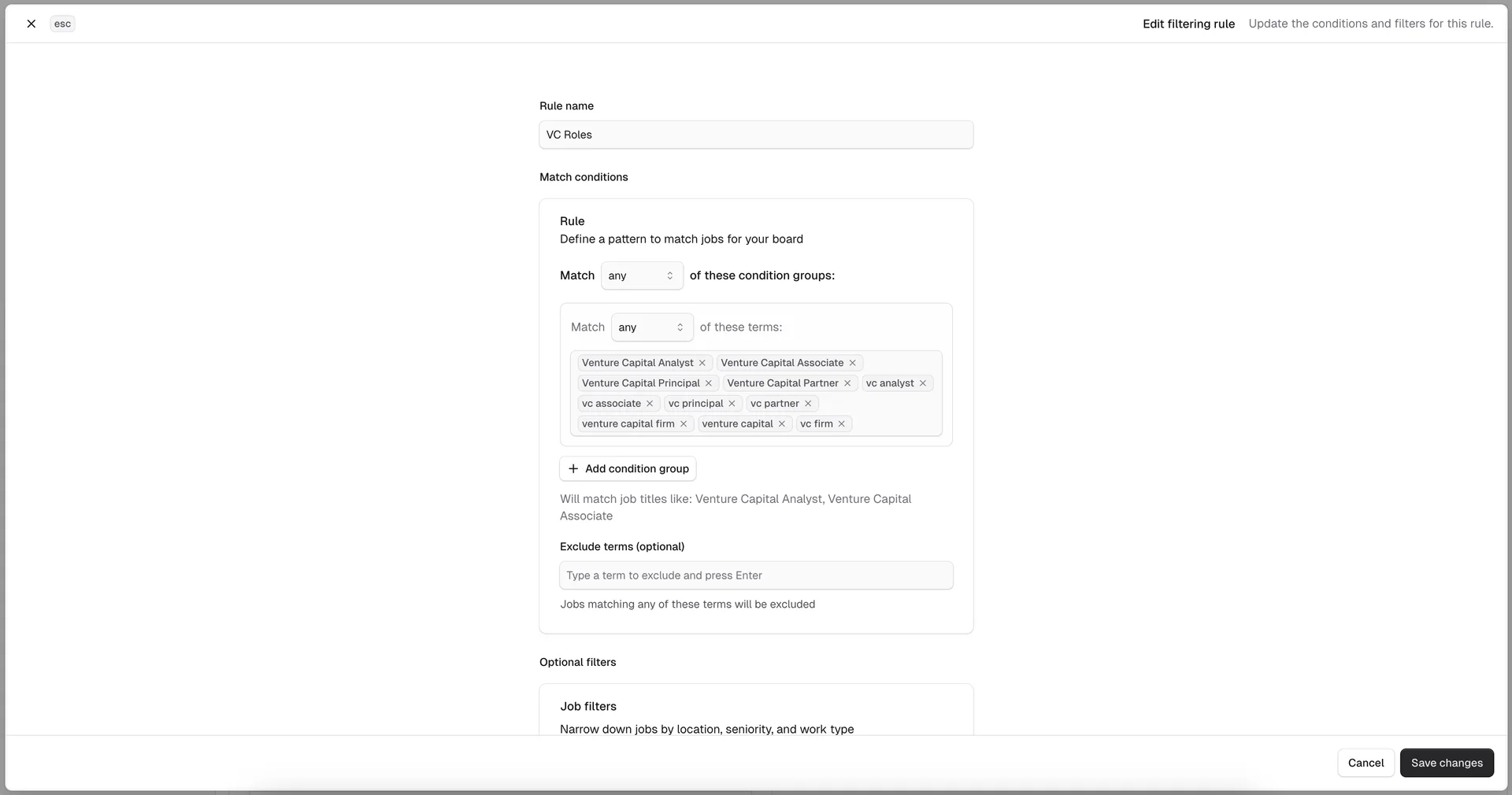
For operators on other platforms, check whether aggregation is included in your plan or requires additional credits. Some platforms charge per-job for aggregation, which can add up quickly on high-volume boards.
Step 4: Set up monetization
Connect Stripe to start accepting payments. Create pricing tiers: a standard listing at $99 and a featured listing at $249 is a common starting point, though pricing varies by niche. In Cavuno, this takes five minutes: connect your Stripe account, create your pricing products, and the employer checkout flow is live.
Consider adding subscription plans for employers who post frequently, like monthly or annual packages at a discount. Subscription revenue is more predictable than one-time posts and increases employer retention.
Step 5: Launch with SEO
Organic search drives sustainable traffic. Three things to configure immediately:
- Custom domain. Connect your domain (jobs.yourbrand.com or yourbrand.com). In Cavuno, add a CNAME record and SSL is provisioned automatically.
- Google for Jobs schema. Purpose-built platforms generate this automatically. Verify it's working with Google's Rich Results Test.
- Programmatic SEO pages. Cavuno auto-generates pages for every category, location, and combination. "Remote Python Developer Jobs" and "Machine Learning Jobs in London" become indexable pages with zero manual effort. Submit your sitemap to Google Search Console.
Within the first week, start publishing content to your built-in blog and building backlinks. SEO compounds. The boards that invest in it early dominate their niches within 12–18 months. Read our job board SEO guide and link building guide for the full strategy.
Which no-code job board platform should you pick?
The "no-code job board" label covers three fundamentally different approaches, and choosing the wrong one costs months of effort. Purpose-built platforms give you the fastest path from idea to revenue. DIY stacks work for small, curated boards where design control is paramount. AI builders are best for quick validation before committing to a platform.
For most operators (associations, communities, agencies, solo founders), a purpose-built platform with strong aggregation, SEO, and monetization is the right starting point. The features that make job boards succeed (aggregation, structured data, programmatic SEO, employer self-serve) aren't things you should be building yourself when they're available for $39/month.
Starting no-code does not have to lock the frontend forever. Cavuno’s SDK provides a later headless path: keep the same managed jobs, accounts, applications, and monetization backend, then introduce a custom frontend only when the business has a proven reason to support it.
Start with the niche. Choose the platform that fits. Launch with jobs on day one. Then invest in marketing and SEO to compound growth.