
Hundreds of millions of job-related searches happen on Google every month, yet the vast majority of job postings never appear in Google's dedicated job search experience. The reason is almost always the same: they lack JobPosting structured data.
Adding schema markup to your job posting pages is the highest-impact free action you can take to get your listings into Google for Jobs. It costs nothing, requires no advertising budget, and once implemented correctly, works automatically for every new job you publish. Yet most job boards and employer career pages still skip it or implement it incorrectly.
This guide serves two audiences. If you're a developer, you'll find complete code examples, property-by-property breakdowns, and implementation patterns you can ship today. If you're a job board owner or hiring team lead who wants to understand the system without writing code, every technical concept is explained in plain language, and we'll point you toward platforms that handle implementation automatically.
JobPosting schema is a Schema.org structured data type that describes a job listing in a machine-readable format using JSON-LD. When added to individual job posting pages, it tells Google exactly what the role is, who's hiring, where it's located, and what it pays, making the listing eligible for Google for Jobs rich results.
Getting jobs into Google for Jobs requires five steps:
- Add JSON-LD markup to each individual job posting page with the five required properties.
- Include recommended properties like salary, employment type, and remote work configuration to improve visibility.
- Validate your markup using Cavuno's free schema validator, Google's Rich Results Test, and the Schema Markup Validator.
- Submit your sitemap and, ideally, connect the Indexing API for faster crawling.
- Monitor performance in Google Search Console's Job posting enhancement report.
This guide covers all five steps in detail, plus the beta education and experience fields most guides skip, three implementation approaches, common mistakes, and real business impact data. If you're building a job board from scratch, our guide to creating a job board pairs well with this one.
What Google for Jobs actually is (and isn't)
Google for Jobs launched in June 2017, and it changed how candidates discover open roles. But the name is misleading: it is not a job board. You cannot log into a dashboard and "post" a job to Google. There is no employer account, no posting fee, no application tracking system. Google for Jobs is an aggregation layer: a search feature that pulls structured job listing data from across the open web and presents it in a unified, filterable interface directly inside Google Search results.
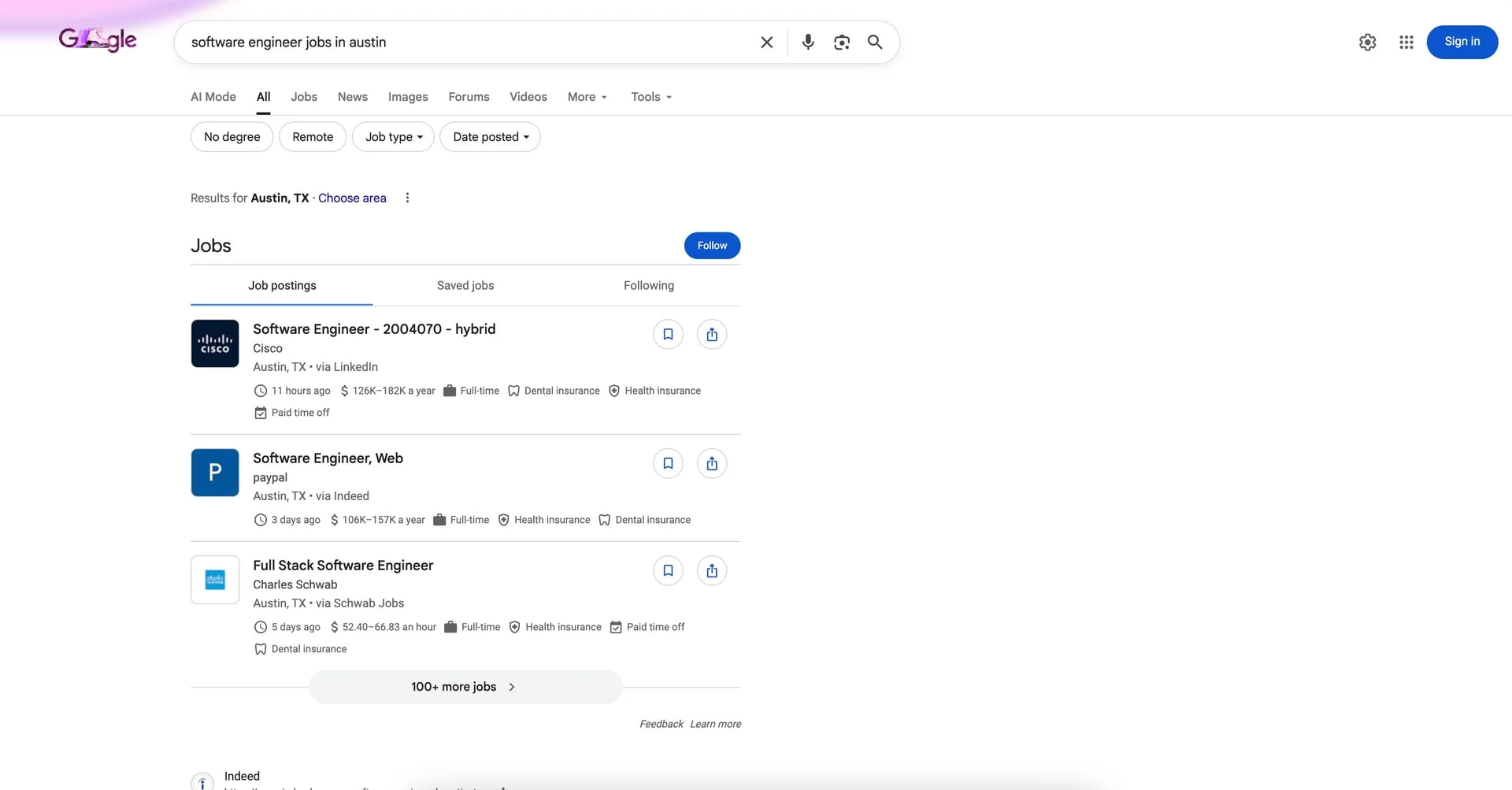
Understanding this distinction matters. When someone searches for "software engineer jobs in Austin" or "remote marketing manager," Google displays a prominent blue widget (sometimes called the "job search box" or "job enriched result") above the standard organic listings. This widget contains job cards sourced from employer career pages, job boards, staffing agencies, and job board aggregators: any site that publishes job postings with valid JobPosting structured data.
How job seekers use Google for Jobs
Job seekers get a full search interface without leaving Google. They can filter by location (with radius controls), date posted, employment type (full-time, part-time, contract, internship), company, and commute time from a specified address. Clicking a job card expands a detail panel showing the full description, salary information (when provided), and an "Apply" button that links directly to the original job posting page on the employer's or job board's site.
The key point for job board operators: Google for Jobs sends traffic to your site. It doesn't capture applications. It doesn't disintermediate you. It functions as a massive, free distribution channel, but only if your pages have the right markup.
Google for Jobs click-through rates and traffic impact
The numbers make a strong case. According to Google's structured data documentation, Nestlé saw an 82% higher click-through rate on pages with rich results compared to those without. In a case study published by Google Search Central, ZipRecruiter reported a 450% increase in CTR after implementing JobPosting schema. These aren't outlier results: rich results in Google Search far outperform plain blue links across every industry studied.
For job boards, appearing in Google for Jobs is table stakes for job board SEO. If your competitor's listings show up in the blue widget and yours don't, you're invisible on the highest-intent job searches: the exact queries where a candidate is ready to apply.
Which countries have Google for Jobs
Google for Jobs is available in most major markets. Here's the full breakdown by region:
- Asia: Bangladesh, Hong Kong, India, Indonesia, Japan, Kazakhstan, Kyrgyzstan, Malaysia, Pakistan, Philippines, Singapore, Sri Lanka, Taiwan, Thailand, Uzbekistan, Vietnam
- Europe: Austria, Belarus, Belgium, Denmark, France, Germany, Greece, Italy, Netherlands, Portugal, Russia, Spain, Switzerland, United Kingdom
- Latin America: Entire region
- Middle East and North Africa: Algeria, Bahrain, Egypt, Iraq, Jordan, Kuwait, Lebanon, Libya, Morocco, Oman, Palestine, Qatar, Saudi Arabia, Tunisia, UAE
- North America: Entire region
- Sub-Saharan Africa: Entire region
Even if your country isn't listed, implementing JobPosting schema prepares you for expansion and still benefits standard search result appearance. If you operate a niche job board targeting a specific geography, test whether the job search widget appears for relevant queries in that market.
How JobPosting schema markup works
Schema.org is a collaborative vocabulary (maintained by Google, Microsoft, Yahoo, and Yandex) that provides a standardized way to describe the content on web pages. The JobPosting type is one of hundreds of schema types, and it's the specific vocabulary Google for Jobs uses to understand and index job listing pages.
The process: you add a block of structured data to each job posting page on your site. This data describes the job in a machine-readable format: title, description, location, salary, employer, and so on. When Google crawls your page, it reads this structured data alongside the visible content, validates it against its requirements, and (if everything checks out) includes the listing in its job search feature.
Embed JSON-LD on each job page
Discovers page via sitemap or Indexing API
Validates schema and content policies
Appears in the job search widget
Why Google recommends JSON-LD over other formats
There are three formats for embedding structured data in web pages: JSON-LD, Microdata, and RDFa. All three are technically valid schema.org implementations. In practice, only one matters.
Google explicitly recommends JSON-LD (JavaScript Object Notation for Linked Data) and has done so since 2015. JSON-LD lives in a <script> tag in the <head> or <body> of your HTML, completely separate from your visible markup. That separation matters for three reasons: maintainability, scalability, and independence from front-end changes.
| Feature | JSON-LD | Microdata | RDFa |
|---|---|---|---|
| Placement | <script> tag, decoupled from HTML | Inline HTML attributes | Inline HTML attributes |
| Ease of implementation | Add one block; no template changes | Requires modifying every relevant HTML element | Requires modifying every relevant HTML element |
| Maintenance | Update data independently of layout | Layout changes can break markup | Layout changes can break markup |
| Dynamic rendering | Easy to generate server-side or inject via JS | Tightly coupled to DOM structure | Tightly coupled to DOM structure |
| Google preference | Explicitly recommended | Supported but not preferred | Supported but not preferred |
| Readability | Standard JSON, easy for any developer | Scattered across HTML, hard to audit | Scattered across HTML, hard to audit |
With Microdata and RDFa, you embed structured data attributes directly into your HTML elements: itemprop, itemscope, typeof, property, and so on. Your structured data is woven into your page templates. If a designer changes the layout, a developer refactors the markup, or your CMS updates its template structure, the structured data can silently break. Debugging means inspecting individual HTML elements across the entire page.
JSON-LD eliminates this problem. You generate a single JSON object and drop it into a script tag. The visible page and the structured data are independent. You can change your entire front-end framework without touching the schema. For job boards with hundreds of thousands of listing pages, that independence saves hours of debugging.
For the rest of this guide, every example uses JSON-LD. If you're evaluating job board software, check whether it outputs JSON-LD natively. It's a signal the platform takes structured data seriously.
Anatomy of a JobPosting JSON-LD block
Here are complete, real-world JSON-LD blocks for the three most common work arrangements. Each includes required, recommended, and beta properties. We'll walk through every property afterward.
@context and @type: Every JSON-LD block starts with these two properties. @context tells parsers you're using the schema.org vocabulary. @type specifies this is a JobPosting. These are boilerplate but mandatory. Omit either one and the entire block is invalid.
title: The job title. Google requires this to be the actual title of the position, not a promotional string. "Senior Software Engineer" is valid. "AMAZING OPPORTUNITY — Senior Software Engineer — Apply Now!!!" will get your listing flagged or filtered.
description: The full job description, including responsibilities, qualifications, and any other relevant details. Google accepts HTML within this field, and you should use it. Structured HTML with paragraph tags, lists, and headers makes the description readable inside the Google for Jobs detail panel. This must match the visible content on the page.
datePosted: The date the job was originally published, in ISO 8601 format. Google uses this for the "date posted" filter in the job search widget. Backdating or repeatedly resetting this date to appear "fresh" violates Google's guidelines.
validThrough: The expiration date of the posting in full ISO 8601 datetime format with timezone. Including it gives you explicit control over when Google removes the listing from results.
employmentType: One of a fixed set of values: FULL_TIME, PART_TIME, CONTRACTOR, TEMPORARY, INTERN, VOLUNTEER, PER_DIEM, or OTHER. This drives the employment type filter in the job search widget.
hiringOrganization: A nested Organization object identifying the employer. The name property is required. sameAs should be the company's official website URL. logo appears alongside the listing in the search widget and improves visual prominence.
jobLocation: A nested Place object containing a PostalAddress. For on-site jobs, this drives the location and commute-time filters. addressCountry is required; include addressLocality and addressRegion for higher-quality results.
baseSalary: A nested MonetaryAmount object with a QuantitativeValue inside it. This three-level nesting structure trips up first-time implementers. Salary information is technically recommended, not required, but including it improves click-through rates.
identifier: A PropertyValue object containing your internal job ID. This helps Google recognize that the same job appears on multiple sites and deduplicate them into a single result.
One critical rule: each job posting page must contain exactly one JobPosting schema block, and that block must describe the job visible on that page. You cannot put structured data for multiple jobs on a search results page or category page. Google requires a one-to-one relationship between the schema and a dedicated, crawlable job detail page. This is why job boards built with proper individual job pages have a structural advantage for Google for Jobs eligibility.
The five required properties Google demands
These five properties are non-negotiable. Miss any one and your listing won't appear in Google for Jobs. Google's crawler validates each JobPosting against a strict checklist. If a required property is absent, malformed, or misused, the entire listing is silently dropped. No warning, no partial indexing, no second chances.
title: the mistakes that get your listings rejected
The title property is the single most abused field in JobPosting schema. Google expects it to contain the job title and nothing else: no company name, no location, no salary, no job codes, no dates, and no special characters.
That's it. Clean, undecorated, exactly what a candidate would search for. Compare that with what Google's documentation explicitly flags as invalid:
Both of these will get your listing rejected. The first stuffs company name, location, and salary into a field meant for the role alone. The second uses special characters and marketing language that has no place in structured data.
There's a subtler mistake that trips up developers who've worked with other schema.org types. The name property and the title property are not interchangeable for JobPosting:
This is incorrect. While name is the generic schema.org property for naming things, Google's JobPosting documentation specifically requires title. Using name instead means your listing fails validation, even though it might look fine in a generic schema testing tool.
If you're a third-party job board or aggregator, do not modify the job title provided by the employer. Rewriting "Senior Data Analyst" to "Senior Data Analyst (Remote, $120K+)" to boost click-through rates will get your structured data flagged and can trigger a manual action across your entire site.
description: HTML formatting Google actually processes
The description field holds the full job description and must be written in HTML format. This isn't a plain-text summary or a truncated teaser: Google expects the complete posting, including responsibilities, qualifications, required skills, working hours, education requirements, and experience level.
The HTML tags Google actually renders in the job search card are limited to three:
<p>for paragraphs<ul>and<li>for bulleted lists
Tags like <h1>, <strong>, <em>, and <br> won't break anything, but Google ignores them when formatting the job detail panel. Use paragraphs and lists to convey structure.
Two validation rules catch people off guard. First, the description cannot be identical to the title. A listing where both fields contain "Software Engineer" fails. Second, the structured data description must match the visible content on the page. Google cross-references the two, and significant discrepancies can result in the listing being dropped.
datePosted: the date that powers freshness filters
The datePosted property records when the job was originally published. It accepts ISO 8601 format: either a simple date or a full datetime with timezone offset:
Google uses this for the "date posted" filter in the job search widget. Backdating or repeatedly resetting this date to appear "fresh" violates Google's guidelines.
hiringOrganization: nested Organization schema done right
The hiringOrganization property requires a nested Organization object. Only name is required within it, but sameAs and logo are strongly recommended.
The name should be the company's legal or commonly recognized name, not a specific office location, division, or department. "Acme Corp" is correct. "Acme Corp: San Francisco Engineering Office" is not.
The sameAs property should point to the company's official website and canonical profile pages (LinkedIn, X/Twitter, Wikipedia). You can pass a single URL or an array of URLs. Multiple sameAs entries help Google's Knowledge Graph connect the job posting to the right entity with higher confidence.
For the logo, note that Google uses the same logo for job postings as the image in the company's Knowledge Graph card. Third-party job sites can provide a different logo via the logo property. The image width-to-height ratio must fall between 0.75 and 2.5.
For staffing agencies posting on behalf of clients who want to remain anonymous, use "name": "confidential" as the organization name. Google recognizes this convention and will display the listing without a company name rather than rejecting it.
jobLocation: when you don't need it at all
The jobLocation property uses a nested structure (Place containing PostalAddress) to specify where the job is based. The most common validation error here is omitting addressCountry from the PostalAddress. City and state alone aren't sufficient; Google requires the country code.
For companies hiring across multiple offices, jobLocation accepts an array:
Each location generates a separate entry in Google for Jobs results, multiplying your visibility from a single structured data block.
Here's the exception that surprises most implementers: jobLocation is not required at all if you include applicantLocationRequirements. For fully remote jobs where the physical office is irrelevant, specifying where applicants must be located replaces the need for a job location.
Recommended JobPosting schema properties that improve rankings
Required properties get you in the door. Recommended properties get you noticed. Google won't reject a listing that's missing these fields, but including them improves your visibility and click-through rate. Google's own documentation notes that "adding recommended properties can improve the quality of search results for users," and the ZipRecruiter case study (450% CTR increase) involved full recommended property implementation.
baseSalary: how to add salary to JobPosting schema
Salary is the highest-impact recommended property. Google for Jobs displays salary ranges prominently in search results, and candidates filter heavily by compensation. Listings with salary data get more clicks because candidates can self-qualify before clicking through.
The baseSalary property uses a nested structure (MonetaryAmount containing a QuantitativeValue) that supports both exact figures and ranges:
For hourly roles:
Technical details that matter: currency must be an ISO 4217 code (USD, EUR, GBP, not "dollars" or "$"). The unitText values (HOUR, DAY, WEEK, MONTH, YEAR) are case-sensitive. Writing "year" instead of "YEAR" can cause the field to be ignored entirely.
One important restriction: only the actual employer should provide baseSalary. Google's documentation explicitly states "Only employers can provide baseSalary." If you're a job board or aggregator, only include salary data that the employer has confirmed. Using baseSalary with unconfirmed compensation figures violates Google's guidelines.
Structured data intersects here with salary transparency legislation. The Colorado Equal Pay Act, California's SB 1162, New York City's Int. 1208-B, and the EU Pay Transparency Directive all require employers to disclose compensation in job postings, with more jurisdictions passing similar laws every year. If you're already legally required to include salary on the page, adding it to your schema takes five minutes. You've done the hard part (getting the pay range on the page). The markup immediately makes your listing more competitive in Google for Jobs results.
employmentType: the accepted values and how to combine them
Google accepts exactly eight values for employmentType, and they are case-sensitive:
FULL_TIMEPART_TIMECONTRACTORTEMPORARYINTERNVOLUNTEERPER_DIEMOTHER
Writing "Full-Time", "full_time", or "fulltime" won't trigger a validation error in most testing tools, but Google may not process the value correctly. Stick to the exact uppercase format with underscores.
For roles that span multiple types (a position open as either a full-time employee or a contractor), pass an array:
Remote and hybrid job schema: getting TELECOMMUTE right
Remote work schema is where most implementations go wrong. Three properties work together to define a job's location flexibility: jobLocationType, applicantLocationRequirements, and jobLocation. How you combine them depends entirely on the actual work arrangement.
| Scenario | jobLocation | jobLocationType | applicantLocationRequirements |
|---|---|---|---|
| On-site only | Required | Omit | Omit |
| 100% remote | Optional (HQ) | "TELECOMMUTE" | Required (countries/states) |
| Remote or on-site (employee's choice) | Required (office) | "TELECOMMUTE" | Optional |
Important distinction: TELECOMMUTE means the employee may or must work remotely 100% of the time. It covers fully remote roles and roles where full-time remote is an option alongside an office. It does not cover traditional hybrid roles where employees must split time between office and home (e.g., 3 days in office, 2 days remote). Google's requirements are explicit: "Don't mark up jobs that allow occasional work-from-home, jobs for which remote work is a negotiable benefit, or have other arrangements that are not 100% remote."
For a fully remote position:
The applicantLocationRequirements array supports both Country and State types, so you can restrict a remote role to specific states. This is useful for companies that can only hire in states where they have a registered entity.
For a role that can be performed at a physical office or fully remotely (employee's choice):
Including applicantLocationRequirements is optional for roles with a physical office, but recommended. It tells Google where remote applicants must be located, which improves the accuracy of location-based results.
Using TELECOMMUTE on an on-site role to attract more applicants is a direct violation of Google's guidelines and can result in a manual action. Google actively monitors for this kind of misuse because it degrades the candidate experience.
identifier and directApply: the overlooked properties
Two properties that most implementations skip (identifier and directApply) solve real problems at scale.
The identifier is defined by Google as "the hiring organization's unique identifier for the job," typically the requisition ID from the employer's ATS. It serves a critical purpose: deduplication. When the same job appears on the employer's careers page, LinkedIn, Indeed, Glassdoor, and three niche job boards, Google needs a way to recognize they're all the same position. Without identifier, Google relies on fuzzy matching of title, company, and location, which frequently results in duplicate listings or Google choosing a third-party listing over the employer's own page.
The directApply property is a boolean that tells Google whether the URL offers a direct apply experience. Google defines this as "a short and simple application process on your page without unnecessary intermediate steps." Specifically, you qualify for directApply: true if:
- The user completes the entire application on your site
- The user doesn't have to click apply and provide information more than once
- The posting includes direct contact instructions (email, phone, or address) for the hiring company or their representative
If the user has to sign in or log in more than once, or navigate through unnecessary intermediate steps, that's not a direct apply experience. Set directApply to false or omit it.
validThrough: the expiration trap
validThrough is a recommended property, not a required one. But Google's docs add an important caveat: it's required for job postings that have an expiration date. If a job posting never expires, or you don't know when it will expire, you can omit it.
Here's the trap: if a job expires and you don't handle the removal properly, Google may issue a manual action against your site. Google's documentation explicitly warns that stale job postings degrade user experience and can trigger penalties.
There are three ways to properly remove an expired listing:
- Set
validThroughto a past date. The simplest approach: update the value and Google will delist it on the next crawl. - Return a 404 or 410 HTTP status code. A 410 (Gone) is preferable because it signals permanent removal, prompting faster deindexing.
- Remove the structured data entirely. Keep the page live but strip the JobPosting JSON-LD. This works when you want the page to remain indexed for SEO but no longer appear in Google for Jobs.
For time-sensitive removals, use Google's Indexing API with a URL_DELETED notification type. Standard crawling can take days. The Indexing API processes removals within hours.
Other recommended properties worth including
Several additional Schema.org properties for JobPosting don't get their own filters in Google for Jobs but contribute to comprehensiveness and may influence ranking:
skills: Specific skills required (e.g., "Python", "Project Management"). Helps Google understand role requirements.qualifications: Formal qualifications beyond education (e.g., "PMP Certification", "CPA License").responsibilities: Key duties of the role. Supplements thedescriptionwith structured data.jobBenefits: Benefits like "Health Insurance", "401(k)", "Remote Work Stipend". Increasingly relevant as candidates filter on perks.workHours: Expected working hours (e.g., "40 hours per week", "Flexible schedule"). Useful for part-time and shift-based roles.industry: The industry of the hiring organization.occupationalCategory: O*NET-SOC occupation code for standardized classification.totalJobOpenings: Number of positions available.
These properties take minutes to add and round out your structured data profile. Properties that are informational today may become ranking signals in a future algorithm update.
Beta JobPosting schema properties worth adding now
Google introduced three beta properties for JobPosting schema in March 2021, responding to the push to remove degree requirements from job postings. Companies like Google, Apple, and IBM had already started dropping degree requirements, and several US state governments followed suit. These properties remain in beta, meaning they may not have a visible effect in search results yet. But implementing them now signals forward-readiness and aligns your listings with the skills-first hiring movement that's reshaping recruitment.
These properties give Google richer signals about your roles, and when they graduate from beta, you'll already be ahead.
educationRequirements: credential categories and array format
The educationRequirements property accepts either a simple text string or a structured EducationalOccupationalCredential object. The structured format gives Google machine-readable credential data instead of freeform text.
The credentialCategory field accepts five standardized values: high school, associate degree, bachelor degree, professional certificate, and postgraduate degree. These values are US-centric and may not map directly to every country's education system. Pick the closest equivalent for your region.
For a role requiring a single credential:
What most implementations miss: educationRequirements can be an array. If your position accepts candidates with either a bachelor's degree or a professional certificate, you represent both options:
For roles with no education requirement at all, Google accepts the text value "no requirements":
This is worth specifying explicitly rather than omitting the property. It tells Google the absence of a degree requirement is intentional, not an oversight.
This array format matters because it widens your candidate pool. When Google starts using these fields in filtering (which the beta status strongly suggests is coming), listings that accept multiple credential paths will surface to more candidates than those locked to a single degree requirement.
experienceRequirements: the complex AND/OR logic
The experienceRequirements property defines minimum work experience using OccupationalExperienceRequirements. At its simplest, you specify monthsOfExperience as an integer:
Where this property gets interesting is how Google interprets complex requirements. Google's documentation describes two scenarios:
- OR logic (either/or): "12 months as a chef or 24 months as a sous chef." The candidate may have either experience, so you use the minimum:
"monthsOfExperience": 12. - AND logic (both required): "12 months as a chef and 24 months as a sous chef." The candidate must fulfill all requirements, so you use the higher minimum:
"monthsOfExperience": 24.
In both cases, you set monthsOfExperience to represent the minimum that makes the candidate eligible. Google's guidance is to use the single number that captures the lowest bar for entry. Describe the full detail in the description property, where candidates can read the complete requirements.
Like educationRequirements, you can set this to "no requirements" for entry-level roles with no experience requirement:
experienceInPlaceOfEducation: opening doors for non-traditional candidates
The experienceInPlaceOfEducation property is a simple boolean with outsized impact on candidate reach. When set to true, you're telling Google that relevant work experience can substitute for the formal education listed in educationRequirements.
This property must be used in combination with both educationRequirements and experienceRequirements. It doesn't work in isolation: Google needs all three to understand the full picture.
This markup tells Google: "We prefer a bachelor's degree, we require 48 months of experience, and candidates with the experience but without the degree should still be considered." That widens your candidate pool and aligns with the broader skills-first hiring trend. If Google ever introduces education-based filters in Google for Jobs (which these beta properties strongly suggest they're building toward), having experienceInPlaceOfEducation set to true could keep your listings visible to candidates who filter out degree-required roles.
Three ways to implement JobPosting schema
Understanding the schema properties is half the battle. The other half is getting the markup onto your pages in a way that's accurate, maintainable, and scalable. Your approach depends on how many job listings you manage and your technical resources.
Manual JSON-LD: maximum control, maximum effort
Writing JSON-LD by hand gives you control over every property, value, and nesting decision. For a single-site employer with a handful of open roles, this can work. You write the markup (or generate it with a tool like the TechnicalSEO.com schema generator or Schemantra), embed it in a <script type="application/ld+json"> tag in your page's HTML, validate it with our free JobPosting schema validator or Google's Rich Results Test, and deploy.
The advantage is total control with zero platform dependency. The disadvantage is that it doesn't scale. Every new job posting needs fresh markup. Every edit (a salary change, a location update, a new deadline) requires manually updating the JSON-LD. You also have to handle expiration yourself: if a role closes and you forget to update validThrough or remove the markup, Google will keep showing a dead listing.
WordPress and CMS plugins for JobPosting schema
If you're running your careers page on WordPress, CMS plugins offer a no-code path to JobPosting schema. Our WordPress job board plugins guide covers the full landscape, but here's the short version. Rank Math includes built-in support with 16+ configurable fields. AIOSEO, Schema Pro, and Yoast SEO offer similar capabilities. Joomla and Drupal have equivalent modules.
The catch is that plugins are only as good as their property coverage. Many only implement the bare minimum required fields and skip recommended properties like baseSalary, applicantLocationRequirements, or the beta properties. In practice, few sites get it right. Plugins don't guarantee correctness; they just make it easier to get something in place.
For Shopify, Wix, Squarespace, Webflow, and Framer, native JobPosting support is limited or nonexistent. You'll typically need custom code blocks or embed elements, bringing you back to the same maintenance challenges as manual implementation.
Job board platforms: schema at scale without the headaches
If you're running a job board or managing hundreds of listings, dedicated job board platforms handle schema generation automatically. The platform dynamically generates JSON-LD from the structured job data you already enter (title, company, location, salary, employment type) and outputs compliant markup on every listing page. When a job expires, the markup is updated or removed without manual intervention.
Cavuno, an AI-native job board platform, automatically generates Google for Jobs-compliant JSON-LD for every job posting. Required properties like title, description, datePosted, hiringOrganization, and jobLocation are populated from the structured job data you already enter. Recommended properties including baseSalary, employmentType, and remote work configurations are included when the data is available. Cavuno also uses AI to automatically extract the beta educationRequirements, experienceRequirements, and experienceInPlaceOfEducation properties from job descriptions, whether posted manually through the admin panel or ingested via the job aggregator. The platform handles job expiration automatically: when a listing expires, it's removed from the sitemap and the validThrough date ensures Google removes it from results.
Other platforms in this category include Job Boardly, JBoard, and SmartJobBoard, each with different levels of schema support and feature sets. For a detailed comparison, see our best job board software guide.
The trade-off is platform dependency and less granular control over the exact markup. But for most job board operators, zero schema maintenance and automatic expiration handling far outweigh the loss of manual control.
Adding JobPosting schema with Google Tag Manager
If you can't modify your page templates directly, Google Tag Manager offers a workaround. You can inject JSON-LD via GTM custom HTML tags, which fires the structured data onto the page at render time.
Google has confirmed that GTM-injected structured data is supported, but with a caveat: it may take longer for Googlebot to discover and process the markup compared to server-rendered JSON-LD. For a small careers page where you need a quick fix, GTM can work. For job boards at scale, it's not the right primary method.
Notify Google fast with the Indexing API
Schema markup makes your jobs eligible for Google for Jobs. The Indexing API makes sure Google finds them quickly before the posting goes stale.
Why sitemaps alone aren't enough for job postings
Google's documentation is unusually direct on this point. They recommend using the Indexing API instead of sitemaps: "For job posting URLs, we recommend using the Indexing API instead of sitemaps because the Indexing API prompts Googlebot to crawl your page sooner than updating the sitemap and pinging Google."
Job postings are time-sensitive content. A 3-day crawl delay (common when relying solely on sitemaps) means candidates miss listings, and employers lose applicants to faster-indexed competitors. For a role that receives 80% of its applications in the first week, those lost days represent real cost.
Sitemaps should still be submitted as a backup. They serve as a fallback discovery mechanism and help Google understand your site's full URL structure. But for job postings specifically, they should not be your primary indexing strategy.
If you do use sitemaps, follow Google's specific guidelines for job posting URLs: ensure <lastmod> values accurately reflect when the page last changed, only include canonical URLs (not duplicate or alternate versions), and exclude search results pages or category listing pages. Google explicitly warns against including non-job-posting URLs in your job sitemap.
Setting up the Indexing API step by step
As of 2025, Google requires explicit approval before you can use the Indexing API. It's no longer auto-enabled. Here's the setup process:
- Create a Google Cloud Console project. Go to console.cloud.google.com and create a new project (or use an existing one).
- Enable the Indexing API. Navigate to APIs & Services, search for "Web Search Indexing API," and enable it.
- Create a service account. Under Credentials, create a service account and download the JSON key file.
- Grant owner permissions in Search Console. Add the service account email address as an owner of your property in Google Search Console.
- Submit an approval request. Complete Google's Indexing API access request form. Approval typically takes a few business days.
Once approved, you get a default quota of 200 URL notifications per day, sufficient for most job boards, though you can request increases for high-volume sites.
The API accepts two notification types:
URL_UPDATED: Send when a new job is published or an existing listing changes (salary update, description edit, location change).URL_DELETED: Send when a job expires, gets filled, or is removed. This is critical for keeping Google's index clean.
For efficiency, batch requests let you submit up to 100 URLs in a single API call. Each batched URL still counts against your daily quota, but you reduce the number of HTTP round trips significantly.
For a complete implementation walkthrough, see our Google Indexing API guide. For broader technical SEO, see our job board SEO guide.
Validate, test, and debug your markup
Rich Results Test vs. Schema Markup Validator: which to use when
Two tools, different purposes.
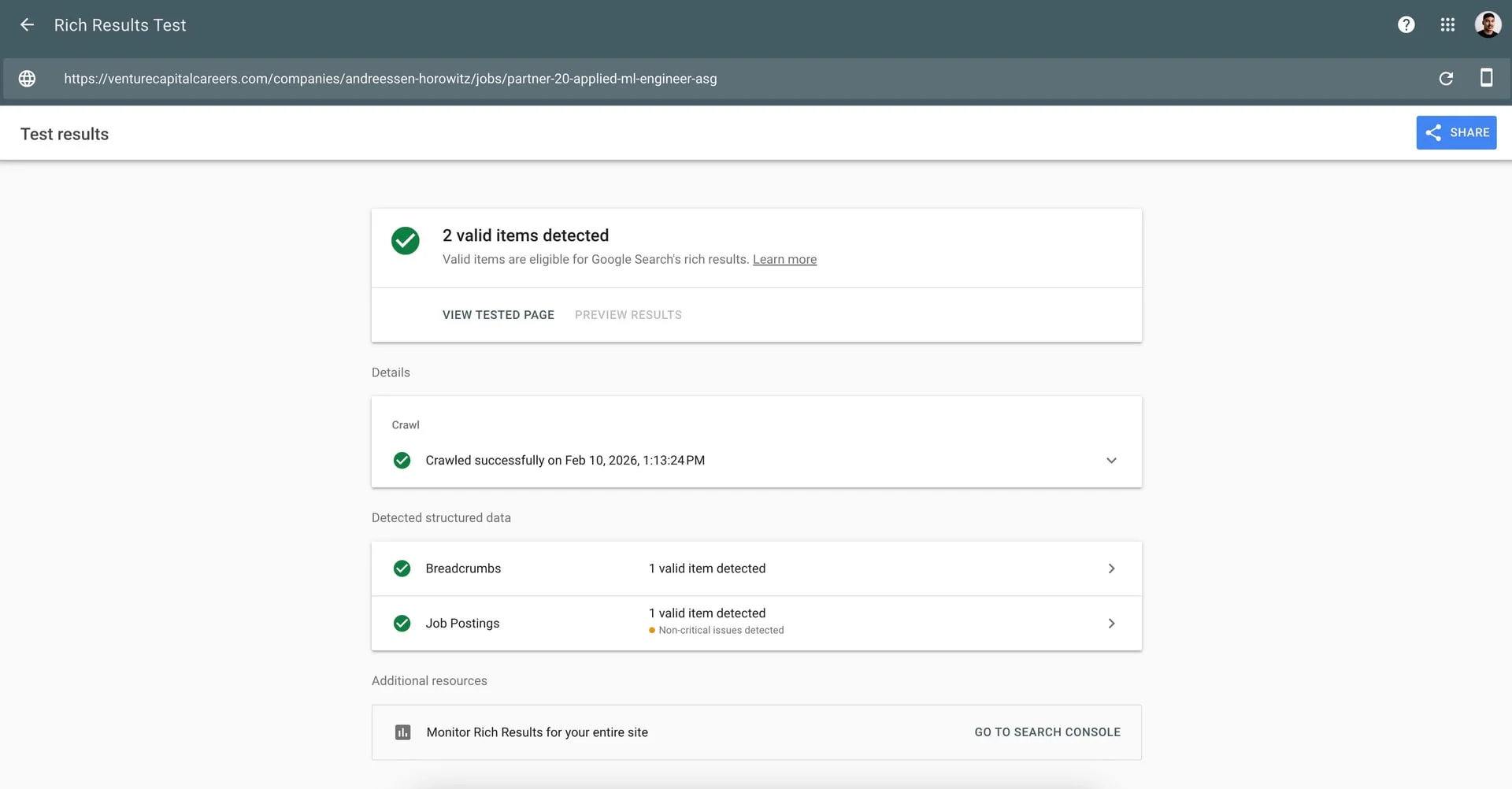
Rich Results Test is your primary validation tool. It tests whether Google can read your structured data and shows which rich result types your page is eligible for. This is the closest proxy to what Google's systems will do with your markup in production.
Schema Markup Validator validates against the full Schema.org vocabulary. It catches syntax errors and structural issues the Rich Results Test might overlook: misspelled property names, incorrect nesting, type mismatches.
Cavuno's JobPosting Schema Validator checks your markup specifically against Google for Jobs requirements. Enter a URL or paste JSON-LD to get a scored report with errors, warnings, and fix suggestions for every property — including salary formatting, remote work configuration, and the beta education and experience fields that other validators skip.
The nuance most guides miss: these tools don't always agree. The Rich Results Test may pass markup that the Schema Markup Validator flags, because Google only enforces a subset of the full Schema.org spec. Conversely, the Validator might approve markup that the Rich Results Test rejects because of Google-specific requirements (like title instead of name). Use both.
For pages already in production, the URL Inspection Tool in Google Search Console shows how Google rendered and indexed a specific page, including whether it successfully extracted your structured data.
The 10 most common JobPosting schema errors
| Error | Fix |
|---|---|
Missing title property | Add title (not name) with clean job title only |
Company name or salary in title | Remove. Title must be the job position only |
| Invalid date format | Use ISO 8601: 2026-02-09 or 2026-02-09T00:00:00+00:00 |
Missing addressCountry | Always include within jobLocation → PostalAddress |
name used instead of title | Replace with title. Google's JobPosting uses title specifically |
| Markup on list/search pages | Only add JobPosting schema to individual job posting pages |
| Expired jobs still indexed | Set validThrough to past date, return 404/410, or use Indexing API URL_DELETED |
| Salary not matching page content | baseSalary must reflect what's visible on the page |
TELECOMMUTE on non-remote jobs | Only use when the employee may or must work remotely 100% of the time |
| Missing hiringOrganization logo | Add logo URL with 0.75-2.5 width/height ratio |
The title vs. name issue alone accounts for a disproportionate share of validation failures. Schema.org uses name as the standard property for most types, but Google's JobPosting implementation specifically requires title.
Platforms like Cavuno prevent these errors by generating schema programmatically from structured job data. There's no opportunity for manual typos or missing fields. If you're implementing schema manually, run your pages through our free schema validator to catch these issues before Google does.
Monitoring JobPosting errors in Google Search Console
Google Search Console provides a dedicated Job posting enhancement report that shows errors, warnings, and valid items across your site. Check it weekly. Errors here mean listings are not appearing in Google for Jobs.
The most common error messages you'll see in this report:
- "A list page should not include structured data for individual jobs" — You've added JobPosting markup to a search results or category page instead of an individual job detail page.
- "JobPosting structured data on expired job" — A listing has passed its
validThroughdate but the page and markup are still live. Remove the structured data, return a 404/410, or update the date. - "Can't submit application on job offer page" — Google's crawler couldn't find an apply button or application path on the page. Ensure the apply action is visible without login.
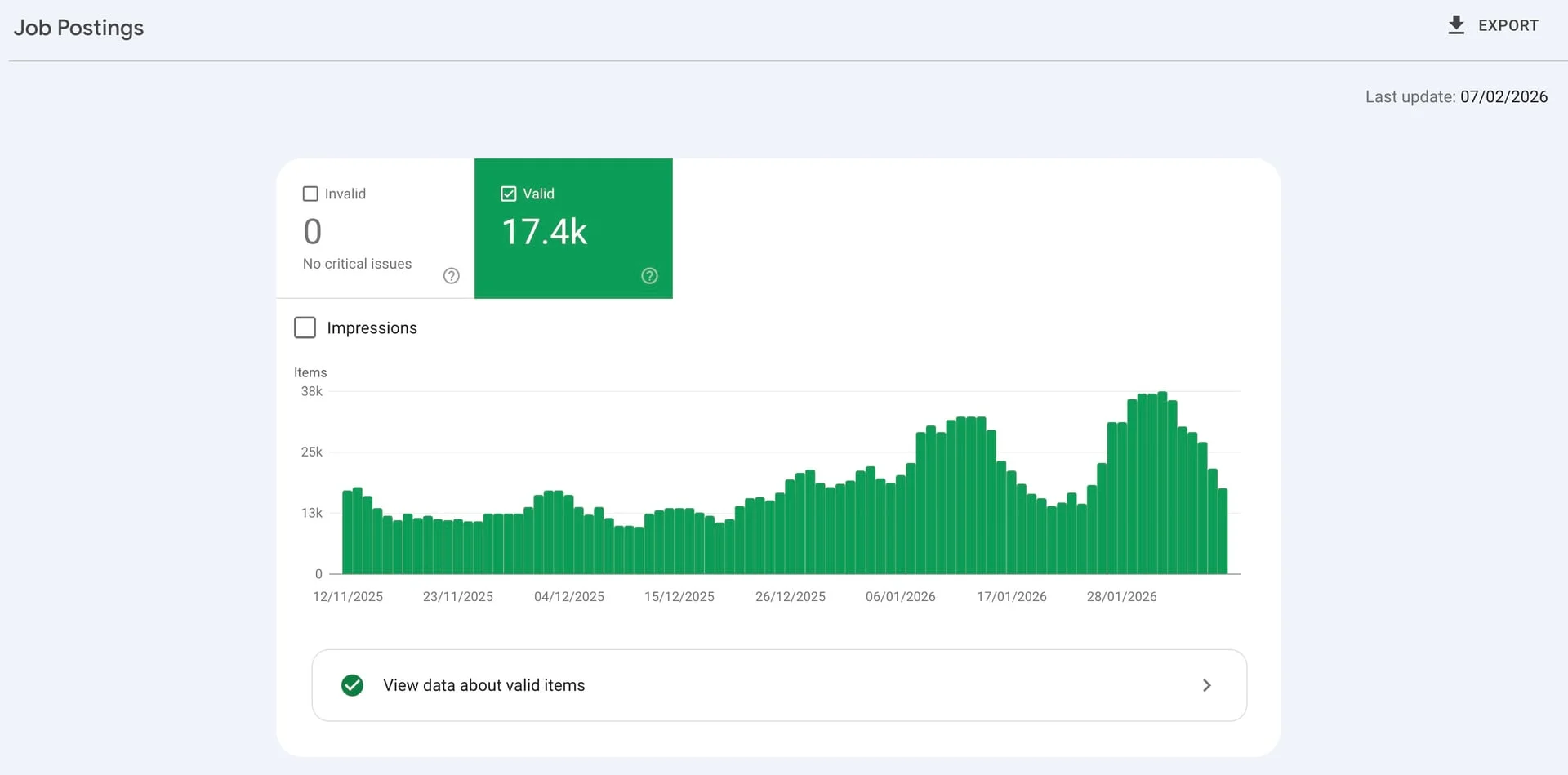
In the Performance report, filter by search appearance to isolate "Job details" and "Job listings." Track four metrics:
- Impressions: How often your jobs appear in Google for Jobs results
- Clicks: How many users click through to your site
- CTR: Click-through rate from the job widget
- Average position: Where your listings rank within results
Set up email alerts for error spikes. A broken deployment that strips schema markup from your templates can take every listing offline simultaneously. You won't notice from organic traffic alone because Google for Jobs traffic shows up as a separate search appearance type.
Measuring the business impact of your schema markup
JobPosting schema case studies and ROI data
The data from organizations that measured before and after implementation speaks for itself.
According to a case study by Workshop Digital, UVA Health Careers saw a 188% increase in job applications via Google for Jobs after optimizing their JobPosting schema.
According to Google's ZipRecruiter case study, implementing JobPosting schema resulted in 450% higher click-through rates, a 3x conversion rate from Google compared to other search engines, and a 35% monthly increase in non-branded organic traffic.
Evidence from Google's structured data documentation and its published case studies reinforces the pattern:
- Rotten Tomatoes saw 25% higher CTR with review rich results
- Food Network achieved a 35% increase in visits from structured data
- Rakuten reported a 3.6x higher interaction rate on rich result pages
- Nestlé measured 82% higher CTR on pages with structured data versus those without
The pattern is consistent across industries: structured data earns richer search results, which drive more clicks.
Setting up your own measurement framework
To attribute impact accurately, you need data from multiple sources.
Google Search Console is your starting point. In the Performance report, filter by Search appearance and select "Job listings" and "Job details." Establish a baseline for at least 2-4 weeks before implementation, then compare impressions, clicks, CTR, and average position post-launch.
Your ATS or applicant tracking system should track application source. Tag traffic from Google for Jobs separately. Google appends specific UTM parameters to application URLs from the job search widget:
utm_campaign=google_jobs_applyutm_source=google_jobs_applyutm_medium=organic
Filter on these parameters in your analytics to isolate Google for Jobs traffic from standard organic search. This lets you measure actual applications, not just clicks.
GA4 event tracking closes the loop. Set up events for application button clicks, apply form submissions, and any other conversion actions. Create a segment for Google for Jobs traffic using the UTM parameters above to isolate its contribution.
The metrics that matter most for proving ROI:
- Applications per job: Are Google for Jobs listings generating more applicants?
- Time-to-fill: Are positions filling faster with this additional traffic source?
- Cost-per-applicant: Compare the effective cost of Google for Jobs applicants (essentially free, minus implementation time) against paid job board applicants
For a complete analytics setup beyond schema-specific tracking, see our job board analytics guide.
Google for Jobs content policies you can't afford to ignore
What triggers a Google manual action
Google actively enforces content policies for job postings, and a manual action can remove your entire site from Google for Jobs (not just the offending listing):
- Structured data doesn't match visible page content. If your schema says the salary is $80,000-$100,000 but the page shows "competitive compensation," that's a policy violation.
- Fake, misleading, or keyword-stuffed job postings. Listings created to drive traffic rather than fill real positions.
- Ads disguised as job listings. Promotional content marked up as JobPosting schema.
- Expired postings that remain indexed. Jobs that were filled weeks ago but still appear in results.
- Job postings that require payment to apply. Legitimate job postings do not charge applicants.
- Login-gated job descriptions. The full job description must be visible without account creation.
- Resume or data collection for non-existent positions. Using fake listings to harvest personal information.
- Career fair invitations or general recruiting pages. JobPosting markup is only valid for specific open positions, not events or general "we're hiring" pages.
- Job requests from applicants. Pages where a candidate describes the work they're seeking are not job postings and can't use JobPosting schema.
Content parity and editorial standards
The core principle is straightforward: every piece of information in your schema must be visible on the page itself. Salary, location, job title, description, employment type: if it's in the structured data, users must be able to see it without inspecting source code.
Google also enforces editorial standards: proper grammar, no all-caps titles, and (for third-party sites) preservation of employer-provided job titles without modification. Adding prefixes like "HOT:" or "URGENT:" violates policy.
Use canonical URLs when the same job appears on multiple pages. This prevents duplicate listing issues and consolidates ranking signals to a single URL.
These aren't suggestions: they're enforced policies, and violations affect your entire domain's eligibility.
How to recover from a Google for Jobs manual action
If Google issues a manual action against your site, you'll see it in the Manual actions section of Google Search Console. The report will describe the specific violation and which pages are affected.
To recover:
- Fix every flagged issue. Remove expired listings, correct mismatched data, delete fake postings, ungate job descriptions.
- Validate your fixes with the Rich Results Test on the affected URLs.
- Submit a reconsideration request through Search Console. Describe what you fixed and what processes you've put in place to prevent recurrence.
Google typically reviews reconsideration requests within a few days to a few weeks. If approved, your listings will start reappearing in Google for Jobs results. If rejected, the response will explain what still needs fixing.
JobPosting schema markup is the single highest-ROI technical investment you can make for job visibility. The implementation cost is measured in hours. The returns (188% more applications, 450% higher CTR, 3x conversion rates) are measured in transformed hiring outcomes. Every required property you add, every recommended field you complete, every listing you keep current compounds into a durable competitive advantage that most job sites still haven't captured.
Whether you implement manually or use a platform like Cavuno, start with the five required properties and validate with the Rich Results Test. Every day without schema markup is traffic you're handing to competitors who have it. Beyond Google for Jobs, this same structured data powers AI search visibility. See our AEO guide for how schema markup helps you get cited by ChatGPT, AI Overviews, and Perplexity.