
The gap between publishing a job posting and Google indexing it can stretch from hours to days. In a market where most applications arrive within the first 72 hours of a listing going live, that delay is a direct revenue problem. Most job boards rely exclusively on XML sitemaps for discovery, which means Google's crawler gets to new listings on its own schedule, not yours. Meanwhile, boards that submit URLs directly through the Indexing API appear in Google for Jobs within minutes.
This guide walks through the complete integration, from Google Cloud project setup and service account authentication through production-grade error handling and quota management, with working code in Python, Node.js, and PHP. The setup takes roughly 30 minutes, plus a waiting period for Google's approval. Everything here draws on first-hand experience operating job boards, Google's official documentation, and real performance data from boards running the API at scale. One critical note before starting: Google's September 2024 policy changes mean that many existing tutorials are now outdated or, worse, actively harmful to follow.
How the Google Indexing API works
The Google Indexing API lets you notify Google when a job posting URL is published, updated, or removed. Googlebot recrawls those pages within minutes instead of days. You authenticate via OAuth 2.0 using a service account, then send one of two notification types: URL_UPDATED (recrawl a new or changed page) or URL_DELETED (page is gone). That is the entire surface area of the API.
Most developers get the scope wrong. The Indexing API officially supports only two content types: pages with JobPosting structured data and BroadcastEvent embedded in VideoObject structured data. Not blog posts. Not company profiles. Not category pages. Only jobs and livestream videos.
Submitting a URL through the API is not the same as getting it indexed. The API tells Google to recrawl the page. It places it in a priority crawl queue. Google then decides independently whether to index it based on normal quality signals. As John Mueller, Senior Search Analyst and Search Relations Team Lead at Google, put it: "Search is never guaranteed." Martin Splitt, Developer Advocate at Google, reinforced this: "Pushing it to the API doesn't mean indexed right away or indexed at all because there will be delays, there will be scheduling." The API accelerates discovery, not inclusion.
For job board aggregators, the Indexing API can notify Google that an eligible job page changed. It does not establish your page as the original source or force Google’s canonical choice. Use consistent canonical URLs, internal links and sitemaps; Google weighs several signals when selecting among duplicate pages.
When you send URL_UPDATED, Googlebot typically fetches the page within minutes and parses the JobPosting structured data. If the markup is valid and the page meets quality thresholds, Google indexes it and surfaces it in Google for Jobs. Submitted URLs are typically crawled within 5 to 30 minutes. Actual appearance in search results can take longer (hours, depending on content quality and structured data accuracy) compared to hours or days via sitemap-only discovery.
When a listing expires or gets filled, send URL_DELETED to drop the page from the index faster than waiting for Googlebot to discover a 404 or noindex tag on its own. Stale listings showing up in Google for Jobs erode trust with job seekers and employers, and Google has stated that boards with high rates of expired listings may see reduced visibility across all their postings.
Why you should not use it for non-job content
Many guides recommend submitting every URL on your job board through the Indexing API. The data says otherwise.
MiroMind, an SEO agency, ran a controlled test disabling Indexing API submissions for non-job content on a client site. The results: organic impressions doubled from roughly 3,000 to 6,000, and clicks increased by 300%. The reason, now confirmed by Google engineers: submitting non-job URLs through the Indexing API signals to Google that the content is ephemeral. That signal actively harms pages you want Google to treat as evergreen, like blog posts, resource pages, and SEO landing pages.
Google's team isn't subtle about this. John Mueller compared using the Indexing API for non-job content to "using construction vehicles as photos on a medical website." Technically possible, but sending exactly the wrong signal. In May 2025 on Bluesky, he went further: "We see a lot of spammers misuse the Indexing API like this, so I'd recommend just sticking to the documented & supported use-cases." Gary Illyes, Analyst at Google, added that the API "may stop supporting unsupported content formats without notice."
Important: Use the Indexing API exclusively for pages with valid JobPosting schema markup. For everything else (company pages, blog content, category pages) rely on sitemaps and standard crawl optimization.
Indexing API vs. sitemaps vs. URL Inspection vs. IndexNow
Existing guides, even from established job board platforms, conflate the different URL submission methods. They are separate systems with separate quotas, separate speeds, and separate use cases.
| Method | What it does | Limit basis | Supported content | Best use case |
|---|---|---|---|---|
| Indexing API | Sends crawl/change notifications; no fixed indexing time | Initial 200 publish requests/day/project for testing; production approval required | JobPosting or eligible BroadcastEvent/VideoObject | Notify eligible job-page changes |
| XML sitemaps | Supplies discovery URLs | Sitemap file/protocol limits | All suitable public pages | Broad site discovery |
| URL Inspection API | Inspects Google’s indexed version; does not submit pages | Separate inspection quotas | All inspectable property URLs | Diagnose indexing and canonical state |
| IndexNow | Notifies participating engines; no Google coverage | Up to 10,000 URLs per POST; not a daily allowance | Changed public URLs | Notify participating engines |
Bottom line: Use the Indexing API as your primary submission method for job postings, XML sitemaps as a fallback, and IndexNow for Bing and Yandex coverage.
A critical distinction: the URL Inspection Tool has a quota of 2,000 requests per day. The Indexing API has a default quota of 200 publish notifications per day. These are completely separate systems. Several widely cited tutorials, including guides from job board software vendors, conflate the two, telling readers they have 2,000 daily Indexing API submissions when they actually have 200. Building your pipeline around the wrong number means hitting quota errors in production.
The dual-protocol strategy most boards miss
For maximum search engine coverage, job boards should submit URLs through both the Indexing API and IndexNow simultaneously. The Indexing API handles Google (by far the dominant engine for job seekers) while IndexNow covers Bing, Yandex, and other participating engines. Bing processes a meaningful share of job-related search traffic, particularly in enterprise and government sectors where Edge is the default browser.
Both APIs accept simple HTTP POST requests with a URL payload. When a new job is published, fire two parallel requests: one to Google's Indexing API (authenticated via service account) and one to the IndexNow endpoint (authenticated via a key file hosted on your domain). Combined with well-structured XML sitemaps as a baseline SEO foundation, this ensures listings get discovered as fast as each search engine allows.
Google Indexing API changes in September 2024
Google changed how the Indexing API works in September 2024. Most guides haven't caught up. If you're following a tutorial written before this date, you'll hit a wall at the very first API call.
Access now requires approval for production use. Google's quickstart lists "Request approval and quota" as an explicit step. The default 200/day quota is available for testing, but expanded usage requires filling out a request form. Before September 2024, most projects could start making requests immediately. Now, many developers report 403 errors until their access is explicitly approved, particularly for new Google Cloud projects.
The rate limit was corrected downward. The previously documented limit of 600 requests per minute was revised to 380. Google's position is that it was "always 380" and the documentation was simply wrong. Any implementation relying on the old figure needs updating.
Multiple service accounts are explicitly prohibited. This was a common workaround for high-volume boards: create several service accounts, each with its own quota, and rotate between them. Google now explicitly warns that "any attempts to abuse the Indexing API, including the use of multiple accounts or other means to exceed usage quotas, may result in access being revoked." Job boards have been penalized for this.
Updated quotas and rate limits
The Indexing API enforces three distinct quotas, each tracked independently:
| Quota | Limit |
|---|---|
DefaultPublishRequestsPerDayPerProject | 200/day |
DefaultMetadataRequestsPerMinutePerProject | 180/min |
DefaultRequestsPerMinutePerProject | 380/min |
The daily publish limit of 200 is the constraint most boards hit first. It resets at midnight Pacific Time. Metadata requests (checking the indexing status of a URL) have a separate, more generous per-minute limit, so query status freely without eating into your publish budget. Monitor your current usage at the API Console quotas page.
All submissions undergo spam detection. Google's quickstart states: "All submissions through the Indexing API undergo rigorous spam detection." Submitting low-quality pages, pages without valid structured data, or non-job content can trigger penalties.
Request quota increases through the quota request form. High-volume boards processing 10,000+ postings per day should submit increase requests early. The review process takes weeks and approval is not guaranteed. Google also warns that "the quota may increase or decrease based on the document quality," so maintain high-quality structured data to protect your existing quota.
How Cavuno handles the Indexing API and IndexNow automatically
If you run your job board on Cavuno, all of the infrastructure described below is handled for you. There is no manual GCP setup, no service account key management, and no submission queue to build.
What Cavuno provisions automatically
When you create a board, Cavuno provisions a dedicated Google Cloud project behind the scenes. This project includes the Web Search Indexing API enabled and a service account with credentials stored encrypted. The provisioning takes one to two minutes and runs in the background. You do not need a Google Cloud account or any API keys.
IndexNow is enabled by default on every board with no setup required. New and updated job pages are submitted to Bing, Yandex, and other participating search engines automatically.
Enabling the Google Indexing API on Cavuno
The Google Indexing API requires one manual step that Google enforces and Cavuno cannot bypass: verifying domain ownership in Google Search Console. Here is the process:
- Connect a custom domain. The Indexing API only works with domains you own. Connect one under Board Settings → Domains.
- Add the service account as an Owner in Google Search Console. Go to Board Settings → General and find the Google Indexing API section. Copy the service account email shown in the settings UI (it looks like
indexing@cavuno-idx-xxxxxxxx.iam.gserviceaccount.com). Then open Google Search Console, navigate to Settings → Users and permissions, click Add user, paste the email, and set the permission to Owner. - Flip the toggle. Back in Board Settings → General, turn on the Google Indexing API toggle. Cavuno will start submitting URLs automatically.
Your daily quota (default 200 requests/day) is tracked and displayed in the settings UI. To request a higher quota from Google, use the overflow menu next to the toggle.
How submissions work
Submissions are queued automatically via a database trigger whenever a job is published, updated, or removed. Cavuno prioritizes new publishes over updates, and updates over deletions. The queue processes on a regular schedule, batching URLs and respecting Google's rate limits.
Password-protected boards and boards with billing offline skip indexing automatically. No stale or private URLs are submitted.
If you are not on Cavuno
The rest of this guide walks through the full manual setup: creating a Google Cloud project, generating service account credentials, wiring up authentication, and building a production submission pipeline. The steps below apply to any job board, regardless of platform.
Set up the Google Indexing API step by step
Create a Google Cloud project and enable the API
- Go to console.cloud.google.com and sign in with the Google account that has access to your Search Console property.
- Create a new project. Name it something identifiable. "yoursite-indexing" works fine.
- Navigate to APIs & Services → Library.
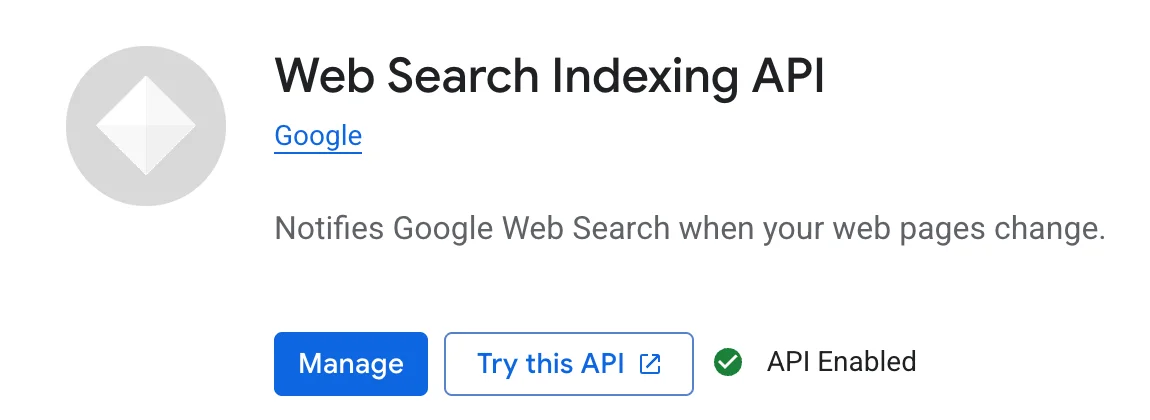
- Search for "Web Search Indexing API" (
indexing.googleapis.com). Don't confuse this with the Custom Search API or other search-related APIs. - Click Enable.
Create a service account and download credentials
- In the Google Cloud Console, go to APIs & Services → Credentials.
- Click Create Credentials and select Service Account.
- Name it descriptively.
job-board-indexingis fine. The name generates an email address in the formatname@project-id.iam.gserviceaccount.com. You'll need this email later. - Skip the optional permissions steps. The service account doesn't need any IAM roles within the Cloud project itself.
- On the service account detail page, go to the Keys tab, click Add Key → Create new key, and select JSON.
- Download the JSON key file and store it securely.
Never commit the JSON key file to version control. In production, use environment variables or a secrets manager like Google Cloud Secret Manager. If you're running on a platform like Vercel or Railway, store the key contents as an environment variable and parse it at runtime.
Add the service account to Search Console
- Go to Google Search Console and select your property.
- Navigate to Settings → Users and permissions.
- Click Add user.
- Enter the service account email address (the one generated during creation), in the format
name@project-id.iam.gserviceaccount.com. - Set the permission level to Owner. The Indexing API requires Owner-level access. Anything less and your API calls will fail.
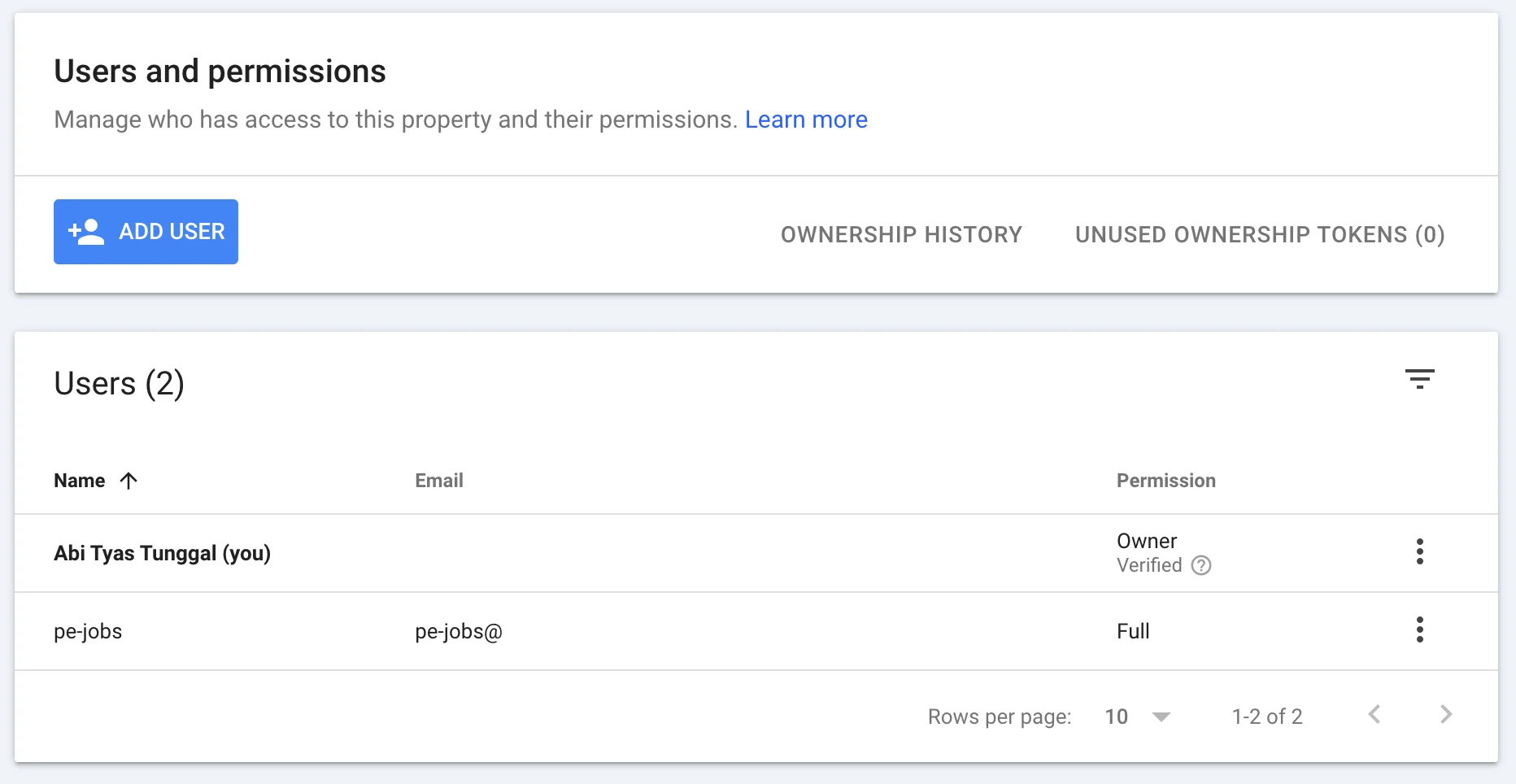
This is the step most people skip. The service account email looks unusual and "Owner" permission feels excessive, but the API requires it. Anything less returns a 403.
Request approval and quota
Google's quickstart lists "Request approval and quota" as step 2, after completing prerequisites. The default 200/day quota is available for testing. For production use, especially if you need higher limits, submit the quota request form:
- Visit the Indexing API quota request form.
- Provide your Search Console property URL exactly as it appears in Search Console (including the protocol).
- Explain your use case: "We operate a job board at yourjobboard.com. Our job listing pages use JobPosting structured data. We'd like to use the Indexing API to notify Google when jobs are published or removed."
- State your expected daily submission volume.
- Submit and wait. Approval typically takes a few business days, though timelines vary.
If you receive a 403 error on your first API call, submit this form before debugging further. Many developers report that new Google Cloud projects require explicit approval before any requests succeed.
Before submitting any URLs, verify your pages pass the Rich Results Test and the Schema Markup Validator. The API only works for pages with valid JobPosting structured data. See our job posting schema guide for the full property reference.
Authenticate and send your first request
Most existing tutorials skip the OAuth 2.0 authentication step. Here's the complete flow, from loading your service account credentials to sending URL notifications, in Python, Node.js, and PHP.
Every request to the Indexing API requires two things:
- A valid OAuth 2.0 access token generated from your service account's private key
- A JSON payload containing the URL and the notification type (
URL_UPDATEDorURL_DELETED)
The API endpoint for all notifications is:
The required OAuth scope is:
Your service account signs a JWT, exchanges it with Google's OAuth server for a short-lived access token (typically valid for one hour), and includes that token in the Authorization header of every API request. The libraries below handle the JWT signing and token exchange automatically.
Quick test with cURL
Before writing any code, verify your setup works with a single cURL command. Replace YOUR_ACCESS_TOKEN with a token generated from your service account (use gcloud auth print-access-token if you have the Google Cloud CLI installed, or generate one programmatically):
A successful response returns HTTP 200 with a JSON body containing the URL and notification time:
If you get a 403, revisit the setup steps. Most likely your API access hasn't been approved or your service account isn't an Owner in Search Console.
Python
Install the required packages:
To notify Google that a job posting has been removed:
Batch requests in Python
Job boards often need to submit hundreds of URLs at once, for example when importing jobs from an employer's ATS feed. The API supports batch requests using the multipart/mixed format, allowing up to 100 URL notifications per HTTP request.
A successful outer batch response does not prove that each notification succeeded. Parse the multipart response and correlate every inner result before marking that URL submitted. The Python helper below adds that check to the existing batch example; apply the same per-part rule in Node.js and PHP. Unknown or missing parts must remain pending, not be recorded as success.
Give each outbound part a unique Content-ID and persist its mapping to the URL/action. Match Google’s response IDs back to that mapping and check that all expected IDs are present exactly once. Mark only successful inner notifications as accepted. Classify403 ownership/approval errors,429 quota errors and temporary 5xx errors separately; a batch of 100 notifications still consumes 100 publish requests.
Node.js
Install the required package:
For batch submissions, construct a multipart/mixed body and POST it to https://indexing.googleapis.com/batch:
PHP
Install the Google API client via Composer:
Verify your integration
After submitting a URL, use the getMetadata endpoint to confirm Google received the notification. This endpoint returns the last time Google was notified about a URL and the notification type. It's your proof that submissions are working before you scale up.
The response includes timestamps for the most recent URL_UPDATED and URL_DELETED notifications:
If the latestUpdate timestamp matches when you submitted the URL, the API is working. If the endpoint returns a 404, Google has no record of a notification for that URL, meaning your submission failed silently or targeted the wrong property.
Metadata requests count against the DefaultMetadataRequestsPerMinutePerProject quota (180/min), not the daily publish quota. Query freely without worrying about burning submission slots.
Testing limitation: The Indexing API only accepts URLs from domains verified in your Search Console property. You cannot submit http://localhost or staging URLs that aren't associated with your service account. Test against your production domain or a verified staging subdomain.
Verification checklist
Before scaling to production, confirm each of these:
- Single URL test — Submit one URL via
URL_UPDATEDand verify a 200 response - Metadata check — Query
getMetadatafor the same URL and confirmnotifyTimeis present - Search Console confirmation — In Search Console, use URL Inspection on the submitted URL. Within 30 minutes, the "Last crawl" timestamp should update
- Batch test — Submit a batch of 5-10 URLs and verify all return 200
- Deletion test — Submit
URL_DELETEDfor a test URL and confirm viagetMetadatathatlatestRemoveappears in the response
Manage quota limits and prioritize submissions
Each URL submission, whether sent individually or inside a batch, counts against your daily quota. Batching reduces HTTP round trips, not quota consumption. A batch of 100 URLs uses 100 of your 200 daily publish requests.
A mid-size job board might receive 5,000 new postings per day but only have 200 quota slots. Even after requesting an increase, most boards operate with far less quota than URLs to submit. Prioritization, not just batching, is the critical optimization.
Prioritizing submissions when quota is limited
Treat your quota as a scarce resource and allocate it by business value.
Priority 1: New postings. Fresh jobs have the highest urgency. A job posted today that doesn't appear in Google for 48 hours has lost its peak candidate-attraction window. Prioritize by recency, newest first.
Priority 2: High-value listings. Sponsored and premium jobs that employers paid for should be indexed fast. An employer who paid for a featured listing and doesn't see it in Google within hours will not renew.
Priority 3: Updates. Salary changes, location corrections, and description edits on existing listings matter but are less time-sensitive. The original version is already indexed. The update improves accuracy, not visibility.
Priority 4: Deletions. Expired jobs should be handled via noindex or 404 status codes first. These signals work independently of the Indexing API. Batch-delete notifications when quota allows, but don't burn quota on deletions when new postings are waiting.
For boards processing 10,000+ jobs daily, common for aggregator-style boards or those running programmatic SEO at scale, you need infrastructure beyond a simple script:
- Implement a submission queue using Redis, a database table, or a message queue like RabbitMQ. Each entry stores the URL, action type, priority level, and submission status.
- Process the queue in priority order via a scheduled worker that runs at quota reset time.
- Track submission status to prevent wasting quota on duplicate submissions.
- Request quota increases early. The review process can take weeks.
Remove expired jobs from Google for Jobs
Expired job management has no industry consensus on best practices. Google's documentation covers the happy path (post a job, get it indexed) but barely addresses what happens when jobs expire. That's the state most job URLs eventually reach.
The full lifecycle from posting to deindexing
Every job listing follows the same arc. What separates a well-managed board from a messy one is whether each transition is handled deliberately.
- Job is created: Add valid JobPosting structured data and send
URL_UPDATED. - Job changes: Update visible content and markup, then send
URL_UPDATED. - Job closes: Choose the page’s future. On a retained 200 page, remove JobPosting markup or set the known expiration in the past; send
URL_UPDATEDto notify the changed page. - URL is removed: If it returns 404/410 or has
noindex, sendURL_DELETEDafter that prerequisite is in place. - Verify: Check page indexing and job-rich-result state separately. Notification receipt does not confirm either removal or a fixed processing deadline.
When to send URL_DELETED vs. use noindex
This is the detail most guides miss: URL_DELETED requires preconditions. The URL must already return a 404/410 status code OR contain a noindex meta tag before the deletion notification takes effect. Sending URL_DELETED on a page that still returns 200 with live content won't work. Google will recrawl the page, see live content, and retain the listing.
The correct sequence is always: remove or mark the content first, then notify Google.
Approach 1: Hard removal (404/410)
Best for jobs that are permanently filled or removed by the employer.
- Flow: Remove the page → return 404 or 410 → send
URL_DELETED - Use 410 (Gone) rather than 404 (Not Found) when a job is permanently closed. The 410 tells Google the page won't return, which accelerates deindexing.
- Downside: Permanently loses any SEO equity the page accumulated.
Approach 2: Soft removal (noindex + redirect)
Best for recurring roles or companies that hire frequently for the same position.
- Flow: Add
noindexmeta tag → updatevalidThrough→ sendURL_DELETED→ optionally 301 redirect to similar active listings - Preserves some link equity through the redirect chain and routes candidate traffic to active listings.
- More complex to implement. Requires logic to identify appropriate redirect targets.
For most boards, a hybrid approach works best: hard removal for one-off positions, soft removal for roles at companies that post frequently. For more on structuring your job pages correctly from the start, see our complete job posting schema guide.
Handling timezone edge cases
For a known closing instant, use an ISO 8601 datetime with the employer’s timezone offset. Google also accepts a date-only validThrough such as 2026-03-15; do not reject it as invalid. If the job has no known expiration date, omit validThrough rather than inventing a deadline. Keep your source closing date and internal expiry policy distinct.
Never use date-only values like "2026-03-15" without a time and offset. Google's parser interprets ambiguous dates inconsistently.
Verifying deindexing
After sending URL_DELETED, confirm that Google processed the removal:
- URL Inspection Tool in Search Console: paste the expired URL and check its index status. Allow 24 to 48 hours.
- Site search: run
site:yourjobboard.com/jobs/expired-listing-slugin Google. If the page still appears after 48 hours, the deletion signal may not have been processed. - Pages report in Search Console: monitor the "Excluded" tab for URLs marked as "Submitted URL marked 'noindex'" or "Page with redirect." A growing count of properly excluded expired URLs is a healthy sign.
Fix common Indexing API errors
The Indexing API returns standard HTTP status codes, but the appropriate response varies by error type. Treating all failures the same, or retrying errors that will never resolve, wastes quota and delays legitimate submissions.
Common error codes and what they mean
| Status code | Google's error message | Action |
|---|---|---|
| 200 | Success | Log and continue |
| 400 | "Missing attribute. 'url' attribute is required." or "Invalid attribute. 'url' is not in standard URL format." | Fix payload, do not retry |
| 401 | Authentication failed, invalid or expired token | Refresh OAuth token, retry once |
| 403 | "Permission denied. Failed to verify the URL ownership." | Check approval status, verify Search Console ownership |
| 429 | "Insufficient tokens for quota 'indexing.googleapis.com/default_requests'" | Stop processing, retry after midnight Pacific Time |
| 500 | Internal server error | Retry with exponential backoff |
| 503 | Service unavailable | Retry with exponential backoff |
The most common error is 403. The exact message, "Permission denied. Failed to verify the URL ownership," traces back to setup: service account not added as Owner in Search Console, submitting URLs for a property you don't own, or your project not having approved access. A 403 never resolves on retry. Fix the root cause before resubmitting.
Building a retry queue with exponential backoff
Only retry errors that might resolve on their own. Server errors (500, 503) are transient and worth retrying. Client errors (400, 403) indicate a problem with your request that won't change between attempts.
The random.uniform(0, 1) jitter prevents thundering herd problems when multiple workers hit a 503 simultaneously and all retry at the same interval.
In production, use a job queue (Celery, Bull, or Sidekiq) rather than blocking a thread with time.sleep(). A dedicated queue ensures failed submissions survive process restarts and gives you visibility into what's failing and why.
Monitor indexing performance in Search Console
The Indexing API is not set-and-forget. Without monitoring, you won't know if submissions are failing silently, if Google is ignoring your pages despite successful API calls, or if quota is being wasted on duplicate submissions.
Search Console signals to watch
Google for Jobs appearance. In Search Console, navigate to Performance and filter by Search Appearance for "Job listing" and "Job details." This shows impressions, clicks, and CTR specifically for your listings in Google for Jobs, the only metric that directly measures whether the Indexing API is doing its job. A sudden drop in job listing impressions usually means structured data errors or indexing failures.
Indexing coverage. Under the Pages report, filter for your job posting URL patterns (e.g., /jobs/*). Track the ratio of indexed to excluded pages. A growing "Discovered, currently not indexed" count for job pages means Google is finding your URLs but choosing not to index them, almost always a content quality or structured data issue.
Crawl stats. Under Settings, open Crawl Stats to monitor crawl request volume and response times. After implementing the Indexing API, expect increased crawl frequency for submitted URLs.
Structured data errors. Under Enhancements, check the Job posting report. This surfaces validation errors across all your job pages: missing required fields, invalid salary formats, expired validThrough dates. Google will stop showing listings with persistent errors in Google for Jobs, regardless of how quickly you submit them via the API.
Building a submission dashboard
Track these metrics in your internal analytics:
| Metric | What it tells you | Target |
|---|---|---|
| Daily submissions sent | Quota utilization | Close to 100% of quota |
| Success rate (HTTP 200) | API health | > 95% |
| Time-to-index (submission to indexed) | API effectiveness | < 24 hours for new jobs |
| Quota remaining | Capacity planning | Request increase before consistently hitting limits |
| Error distribution | Systematic issues | 0% persistent 4xx errors |
Use the getMetadata endpoint to verify submissions are being received. A scheduled job that queries metadata for recently submitted URLs and flags any missing notifyTime values catches silent failures before they compound:
The same check in Node.js:
And in PHP:
Time-to-index is the most valuable metric, and the one nobody publishes. After submitting a URL, query the URL Inspection API at intervals of 1 hour, 4 hours, 24 hours, and 48 hours to record when Google first shows the page as indexed. Over a few weeks, this produces a dataset no public benchmark provides: your actual indexing speed for your specific domain authority and content quality.
For a deeper look at which metrics matter most for job board growth, see our job board analytics guide.
Real-world performance data
Published case studies show the combined impact of JobPosting structured data and Indexing API submission:
- Monster India: 94% increase in organic traffic to job detail pages and a 10% rise in applications. Their CMO stated that "organic traffic almost doubled."
- Jobrapido: 182% increase in organic traffic and 395% rise in new user registrations after implementing JobPosting schema across 20M+ monthly postings. At that scale, the API's batch submission capabilities were critical.
- Saramin (Korean job platform): 2x organic traffic during peak hiring season year-over-year, combining structured data fixes, canonical URL cleanup, and crawl error resolution.
These case studies measure the combined impact of structured data and faster indexing. They don't isolate the Indexing API's contribution from the schema itself. No published study has run a controlled experiment comparing Indexing API vs. sitemap-only submission speed for job postings specifically.
In practice, pages are crawled within 5 to 30 minutes after API submission, compared to hours or days for sitemap-only discovery. The gap matters most for time-sensitive roles. A software engineering position that receives most of its applications in the first week loses real candidates during a 3-day indexing delay. For boards posting hundreds of jobs daily, that delay compounds into significant lost traffic and revenue.
Next steps
The Indexing API is the single most impactful technical SEO implementation available to job boards, but only when set up correctly with the post-September 2024 requirements, proper service account configuration, valid JobPosting structured data on every submitted URL, and a monitoring system that catches failures early.
If you use Cavuno, the GCP project, service account, submission queue, and quota tracking are all handled automatically. Connect a custom domain, add the service account as an Owner in Google Search Console, and turn on the toggle. That is the entire setup.
For a custom-built board, start with the Google Cloud setup. Get your service account approved. Test with a small batch of 10 to 20 URLs before scaling up with the queue and monitoring infrastructure described in this guide. If you run WordPress, plugins like Rank Math's Instant Indexing and IndexNow can handle submissions without custom code, though you'll still need the Google Cloud project, service account, and API approval steps above.
For the complete picture, pair this guide with our job posting schema guide for structured data implementation and our job board SEO guide for the broader organic growth strategy. The boards that index fastest fill roles fastest, and that advantage compounds.