---
title: "How to add a job board to your website (3 ways, from link to native)"
description: "Add a paid job board to your website or app: link a branded subdomain, embed a jobs widget, or build it natively with an SDK. Setup, pricing and launch."
image: /site/images/blog/covers/website-job-board-charles-bridge.webp
publishedAt: 2026-11-25
status: "published"
categories:
- Getting Started
tags:
- add job board to website
- embedded job board
- headless job board
- job board SDK
faqs:
- question: How do I add a job board to my website?
answer: "Pick one of three routes. Put a hosted board on a subdomain such as jobs.yoursite.com and link to it, paste a jobs widget into any page that accepts custom HTML, or build the board into your own pages with an SDK. Most sites start with the subdomain, add the widget to busy pages, and move to the SDK when the board earns enough to justify a build."
- question: Can I embed a job board directly in my website, not on a subdomain?
answer: "Yes. A widget shows live jobs inside one of your pages, and clicks open the full board. To have the whole board in your own pages, including job pages, applications and employer posting, build it with Cavuno's SDK. Your routes, components and design render the jobs; Cavuno runs the data, search, accounts and payments."
- question: Does the job board have to be hosted with the rest of my website?
answer: "No. A hosted board can live on its own subdomain and link back to your site. If you want job pages served by your own site, use the SDK and connect your domain as a self-hosted frontend, which makes your domain the board's canonical address. With the SDK, the board can also live in a folder of your main site, such as yoursite.com/careers."
- question: Should my job board be on a subdomain or a folder of my site?
answer: "Either can rank. A subdomain such as jobs.yoursite.com is the quickest setup and needs no developer. A folder such as yoursite.com/careers keeps the board inside your main site's navigation and links, but you build its pages with the SDK. Choose by how you want the board to fit your site rather than for an automatic ranking boost: compare internal links, page speed and the work involved."
- question: Do I need a developer?
answer: "Not for a subdomain or the widget. Connecting a domain and pasting a snippet are no-code steps. The SDK is for teams with a developer, because you build and host the pages yourself."
- question: Will job listings show in Google for Jobs?
answer: "A Cavuno-hosted board adds JobPosting structured data and sitemaps automatically. With the SDK, the createJobPostingJsonLd and sitemap helpers produce the same markup for pages you render on your own server."
- question: Where do applications and payments go?
answer: "Employers pay through checkout into your own Stripe account on every route. With a subdomain or widget, applications and posting happen on the hosted board. With the SDK, they happen in your own pages through the same API."
- question: Can I add a job board to my app or SaaS product?
answer: "Yes. The SDK runs in browsers, Node.js 20 or newer and Cloudflare Workers, so you can add a jobs tab, a job search page or employer posting to an existing product without building a job board backend."
- question: How much does it cost?
answer: "Cavuno's Starter plan is $39 a month, or $29 a month billed annually, and includes a public board on your domain, the jobs widget and API access for the SDK. You set what employers pay to post."
---
If your website has an audience that employers want to reach, you already have the hardest part of a job board. Employers pay to post, your readers get relevant jobs for free, and the revenue goes into your own Stripe account.
This guide covers three ways to add the board: link a branded board on a subdomain, embed live jobs on any page, or build the board into your own site or app with Cavuno's SDK. It also covers pricing and launch.
Hiring for your own company? You need a careers page connected to your applicant tracking system, which is a different job. This guide is for sites that want to sell job listings to other employers.
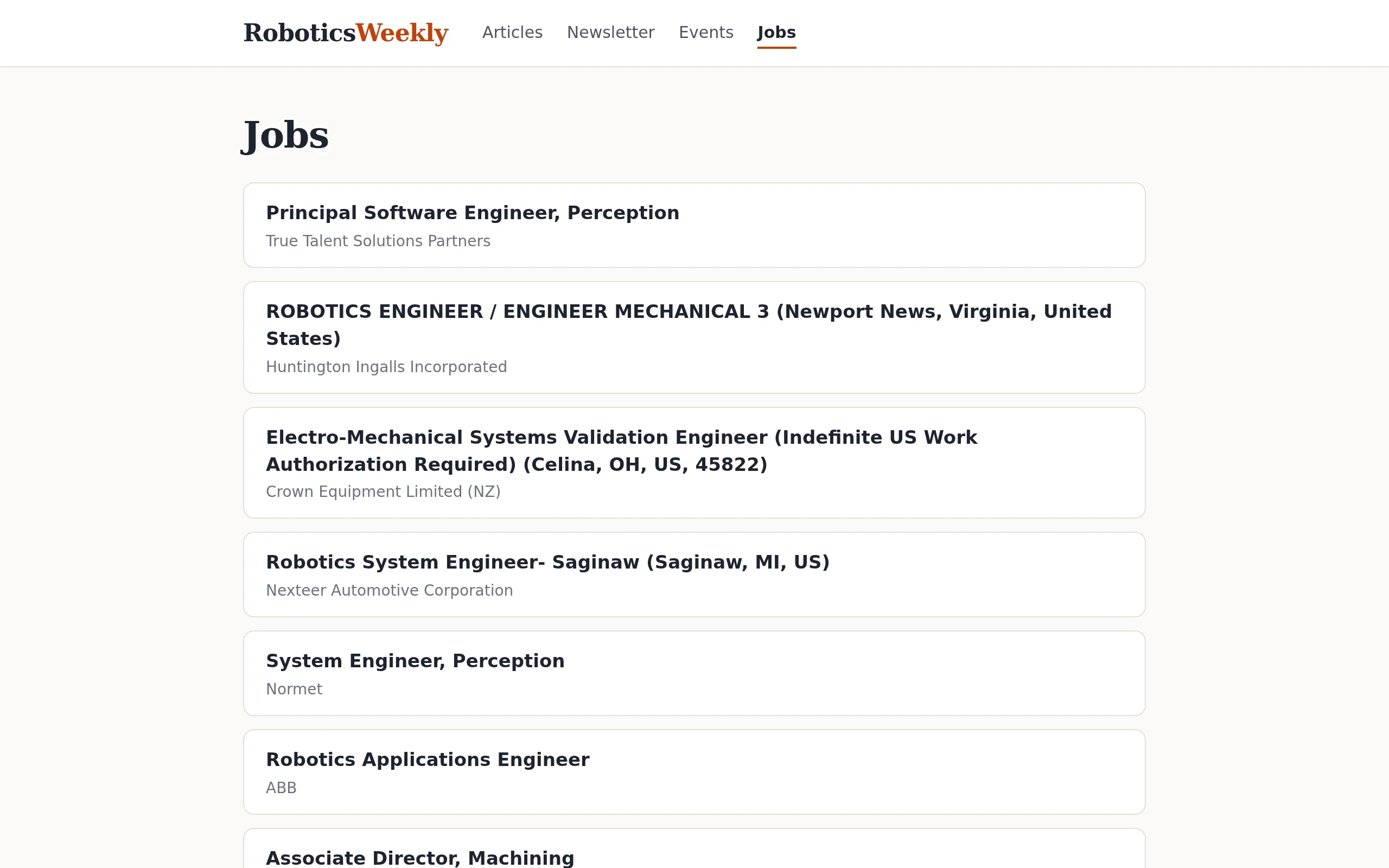
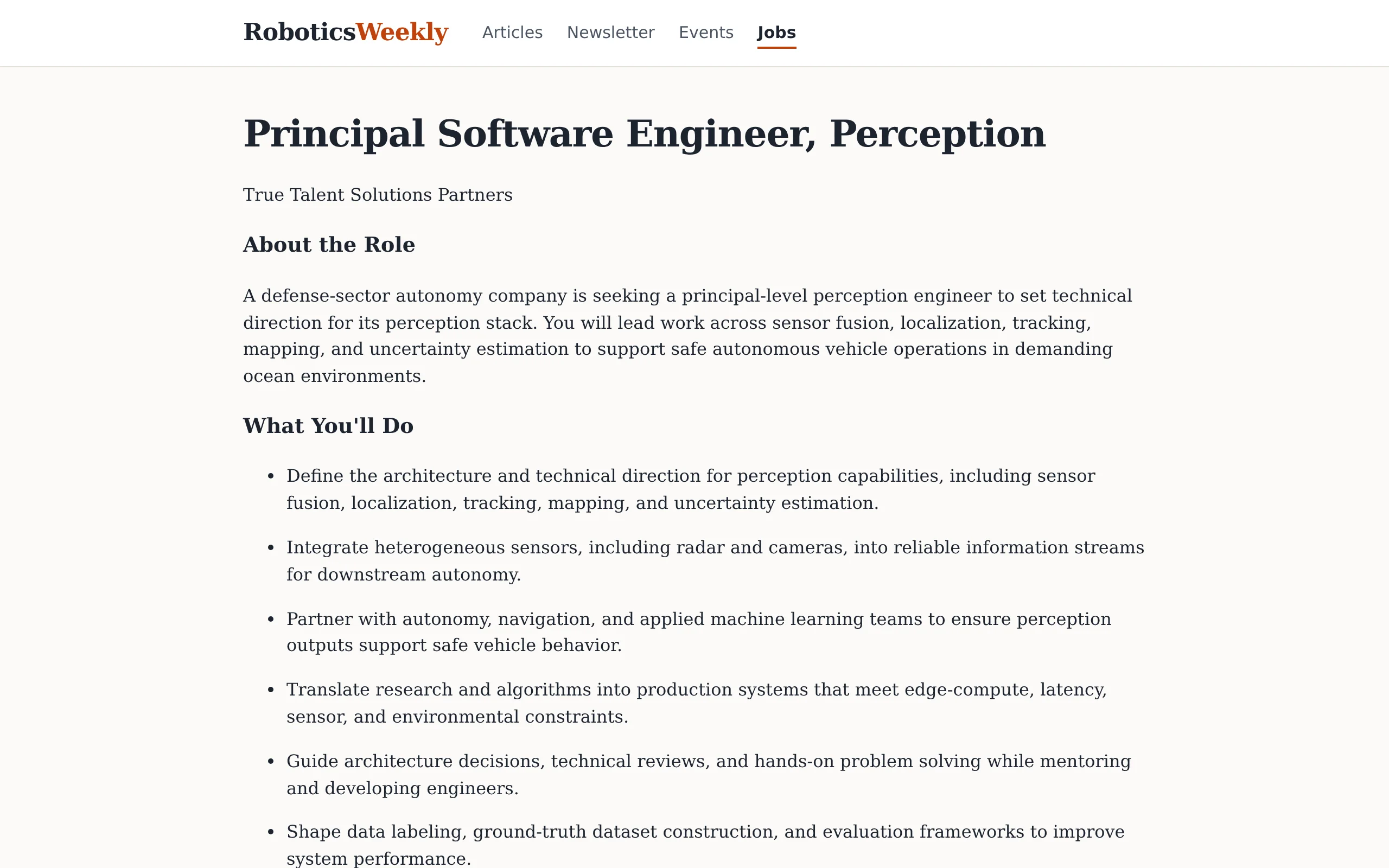
*The SDK example in this guide was built with Next.js 16 and `@cavuno/board` 4.84.0 and tested against the live Robotics Engineer Jobs board on 25 November 2026. The screenshots show a mock publisher site, Robotics Weekly, using those live listings.*
## Is a job board right for your site?
A job board works when your visitors share a profession, trade or industry that employers hire for. A site read by 20,000 nurses or robotics engineers is worth more to an employer hiring for those roles than a general site with ten times the traffic. A broad lifestyle or news audience is harder to sell, because no employer is hiring "everyone".
Done well, a board gives you three things: revenue paid by employers rather than readers, a reason for readers to come back between articles or issues, and new visitors from job searches on Google. If you aren't sure the niche is there yet, [validate the niche first](/blog/validate-job-board-niche).
## Choose how the job board fits into your site
There are six ways people usually do this. They differ in where visitors see jobs, who handles applications and payments, and whether job pages build search traffic on your own domain.
| Option | What visitors see | Applications and payments | Search value for your domain | Setup | Best for |
| --- | --- | --- | --- | --- | --- |
| Plugin or custom build | A board inside your site | Yours to build and maintain | Yes | Days to weeks, plus upkeep | Sites with a developer and unusual needs |
| Partner revenue share | A partner's board under your name | The partner sets prices and keeps a share | Usually little | Short | Publishers who don't want to run a board |
| Free listing widget | Jobs you type in by hand | Apply links out; no paid posting | Little | Minutes | One business listing its own roles |
| Branded subdomain | A separate jobs site styled to match yours | On the board, into your Stripe | On the subdomain | About an hour | Most publishers and communities |
| Cavuno jobs widget | Live job cards in one of your pages | On the board | Little | Minutes | Homepages, articles and resource pages |
| SDK (native) | Jobs, search, applications and posting in your own pages and app | In your pages, into your Stripe | Yes, with server rendering | Days, depending on scope | Sites and products that want the board to be part of them |
**A plugin or custom build** keeps everything on your site, but you build and maintain payments, employer accounts, spam handling, job expiry and Google for Jobs markup yourself. On WordPress, paid listings and job alerts are usually paid add-ons. Our [WordPress job board plugins guide](/blog/wordpress-job-board-plugins) compares them.
**A partner revenue share** is the least work: a job network runs a board under your name. The partner sets prices, owns the employer relationships and keeps part of each sale.
**A free listing widget** displays roles you enter by hand. It suits a business showing a few of its own openings, but employers can't post or pay on it.
The rest of this guide covers the last three, which let you set your prices, keep employer relationships and get paid directly. You can combine them: start on a subdomain, put the widget on busy pages, and move to the SDK when the board earns enough to justify a build.
## Option 1: Link a branded job board on a subdomain
The quickest route is a complete board on your own domain, such as `jobs.yoursite.com`, with your logo, colors and fonts. Cavuno hosts it; you link to it from your navigation, footer and relevant articles.
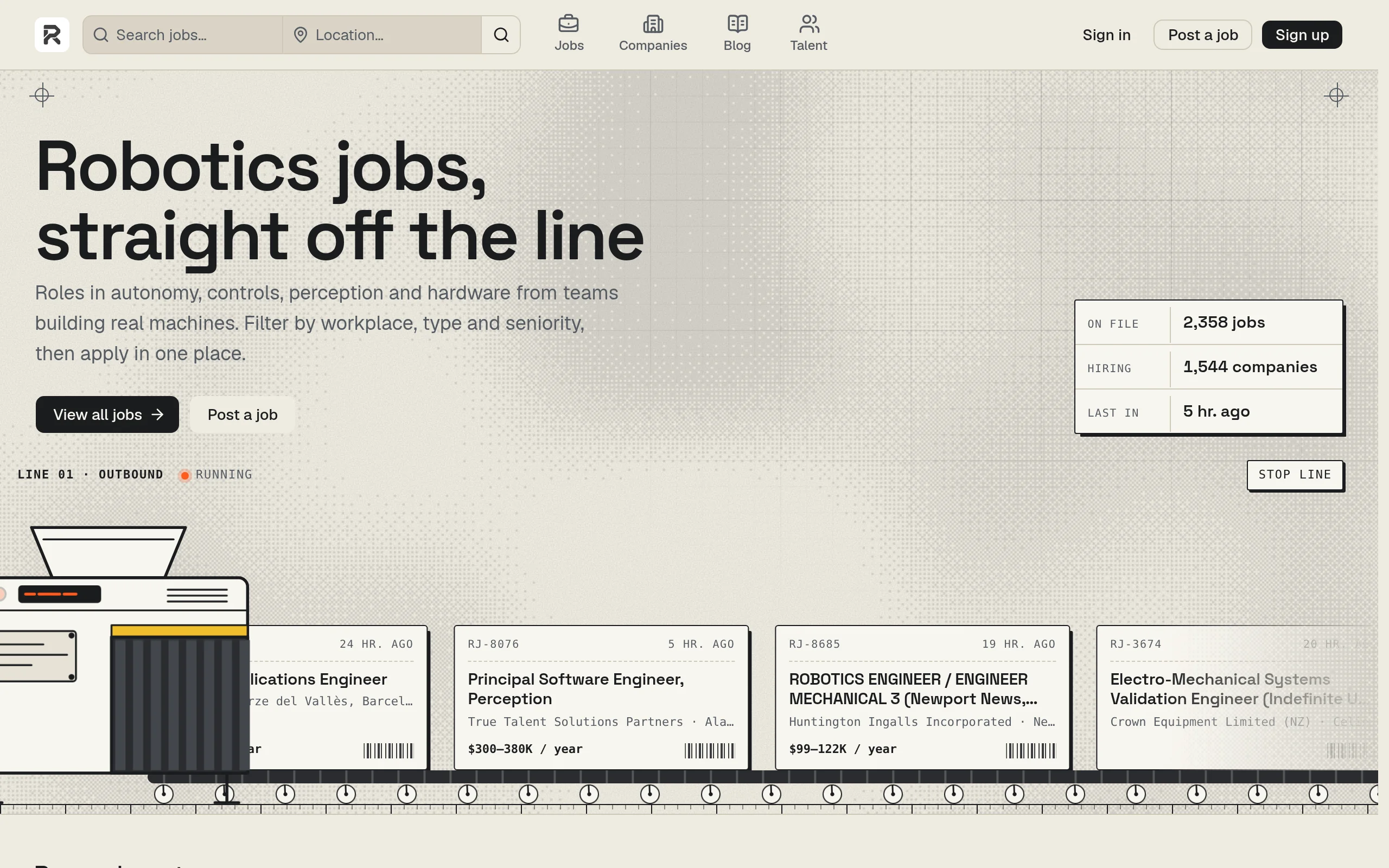
To set it up:
1. Create the board and add your branding.
2. [Connect your domain](https://cavuno.com/docs/board-setup/connect-custom-domain) with the DNS record Cavuno shows you.
3. Create a job posting product with your price and connect Stripe.
4. Add a **Jobs** link to your site's main navigation and footer.
Without any build, you get employer posting and checkout, job alerts, candidate accounts, Google for Jobs markup and sitemaps. The trade-off is that visitors move to a separate site: your main site's navigation, sign-in and design stop at the subdomain, so match the branding closely and make the way back to your site obvious.
## Option 2: Embed a jobs widget on any page
The jobs widget puts live job cards on a page you already have. In Cavuno, open **Jobs → Embed jobs**, choose filters such as a keyword or location, and copy the iframe or script snippet.
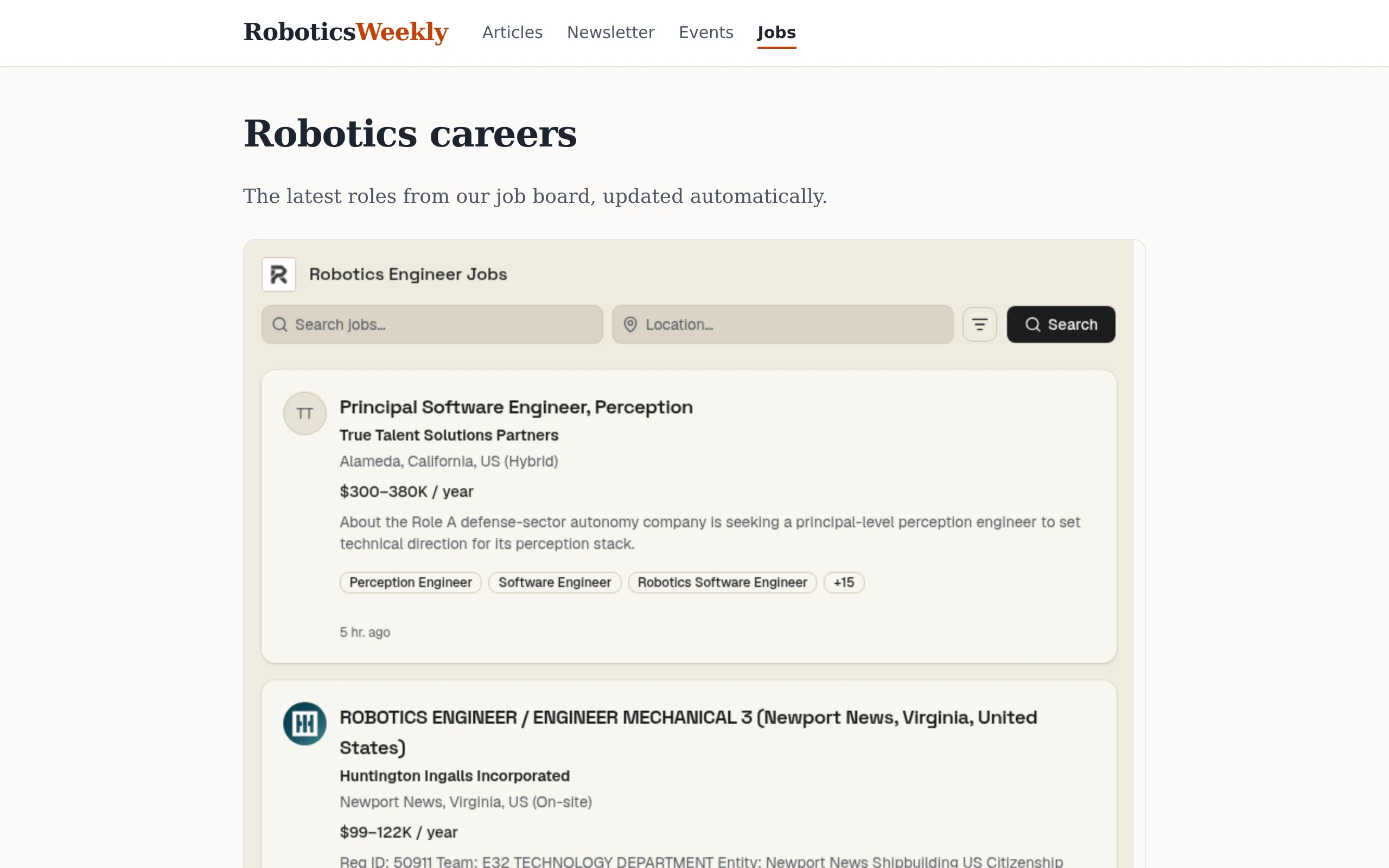
Visitors can search by keyword and location and open advanced filters. Job clicks and searches open the full board in a new tab, so applications, alerts and payments stay on the board. The widget updates itself as jobs are published and expire. The [widget guide](https://cavuno.com/docs/board-setup/embed-jobs-widget) covers every setting.
Paste the snippet wherever your site builder accepts custom HTML:
- **WordPress:** a **Custom HTML** block.
- **Webflow:** a **Code Embed** element, available on Core, Growth, Agency and Freelancer workspaces or with a site plan.
- **Squarespace:** a **Code** block. Iframes and JavaScript in code blocks need the Core plan or above.
- **Wix, Framer and Ghost:** their embed or HTML blocks.
The widget is a strong way to advertise the board on high-traffic pages. The board itself, and the search traffic its job pages earn, stays on the board's domain.
## Option 3: Build the job board into your site with the SDK
Cavuno's TypeScript SDK, `@cavuno/board`, lets your own site render the job board. Your routes, components and design show the jobs; Cavuno runs the backend: job storage, search, candidate accounts, applications, employer posting and payments, and job alerts. Visitors never leave your site or app.
Here is the same live board rendered by the Robotics Weekly site, in its own navigation and typography:
### What you can build
The SDK covers the whole public board, so you can start small and add pieces:
- job listings, search and filters
- job detail pages with similar jobs
- native applications and résumé uploads
- saved jobs and job alerts
- employer self-service posting with checkout
- a candidate paywall
- company pages and salary pages
### Where it runs
Install it from npm for React, Next.js, Astro, React Router, TanStack Start and similar frameworks. It has no runtime dependencies and runs in browsers, Node.js 20 or newer and Cloudflare Workers. For static sites, CMS templates and page builders, a [CDN build](https://cavuno.com/docs/sdk/installing/cdn) loads the same SDK as a script tag.
The SDK identifies your board with a `pk_` publishable key, which is public by design. You can call it straight from a page on Squarespace, Webflow or Wix without a proxy server. Many job APIs need a secret token, which can't be put in a website builder's browser code safely.
### A working example in Next.js
This example adds a jobs list and canonical job pages to an existing Next.js App Router site. Install the SDK and an HTML sanitizer:
```bash
npm install @cavuno/board sanitize-html server-only
```
Add your publishable key, from **Settings → Developer → SDK** in Cavuno, to `.env.local`:
```dotenv
NEXT_PUBLIC_CAVUNO_BOARD=pk_your_publishable_key
```
Create one client in `lib/cavuno.ts`:
```ts
import 'server-only';
import { createBoardClient } from '@cavuno/board';
// A publishable key identifies your board and is safe to expose.
export const board = createBoardClient({
board: process.env.NEXT_PUBLIC_CAVUNO_BOARD!,
auth: { storage: 'nostore' },
});
// The public address of your site, used for canonical URLs.
export const origin = 'https://www.example.com';
```
List the newest jobs in `app/jobs/page.tsx`. The page is rendered on the server and refreshed every five minutes:
```tsx
import Link from 'next/link';
import { jobDetailPath } from '@cavuno/board/paths';
import { board } from '@/lib/cavuno';
export const metadata = { title: 'Jobs' };
export const revalidate = 300;
export default async function JobsPage() {
const { data: jobs } = await board.jobs.list({ limit: 20, sort: 'newest' });
return (
);
}
```
Render each job at its canonical path in `app/companies/[companySlug]/jobs/[jobSlug]/page.tsx`, with a canonical link and JobPosting structured data for Google for Jobs:
```tsx
import { isNotFound } from '@cavuno/board';
import { jobDetailPath } from '@cavuno/board/paths';
import { createJobPostingJsonLd } from '@cavuno/board/seo';
import { notFound } from 'next/navigation';
import sanitizeHtml from 'sanitize-html';
import { board, origin } from '@/lib/cavuno';
export const revalidate = 300;
type Props = { params: Promise<{ jobSlug: string }> };
async function loadJob(jobSlug: string) {
try {
const job = await board.jobs.retrieve(jobSlug);
if (!job.slug || !job.company?.slug) notFound();
const url = `${origin}${jobDetailPath(job.company.slug, job.slug)}`;
return { job, company: job.company, url };
} catch (error) {
if (isNotFound(error)) notFound();
throw error;
}
}
export async function generateMetadata({ params }: Props) {
const { job, company, url } = await loadJob((await params).jobSlug);
return {
title: `${job.title} at ${company.name}`,
alternates: { canonical: url },
};
}
export default async function JobPage({ params }: Props) {
const { job, company, url } = await loadJob((await params).jobSlug);
// Only mark up a job that visitors can apply to from this page.
const jsonLd = job.applicationUrl
? createJobPostingJsonLd({ job, board: await board.context(), shareUrl: url })
: null;
return (
{jsonLd && (
)}
{job.title}
{company.name}
{job.applicationUrl && Apply}
);
}
```
Replace `origin` with your site's address and style the markup with your own components. In our test build, the jobs page listed 20 live jobs, each job page's server HTML contained its canonical link and a complete JobPosting object with salary, location and expiry, and an unknown job returned a 404.
This example sends applicants to the employer's application link. To take applications on your own pages, use `board.jobs.apply`, covered in the [job detail and applications guide](https://cavuno.com/docs/sdk/cookbook/job-detail-and-applications). Employer posting with checkout uses `board.jobPosting`; see [job posting and checkout](https://cavuno.com/docs/sdk/build-your-board/job-posting-and-checkout).
### Why native job pages help your search traffic
Job pages are some of the best search pages a niche site can have: each is a fresh, specific page that can also appear in Google's job search. An iframe or a widget that draws jobs with JavaScript leaves that value with the board, because search engines credit embedded content to its source.
An SDK board rendered on your server, as in the example above, serves real HTML with the job markup on your own domain. The SDK includes [structured data helpers](https://cavuno.com/docs/sdk/frontend-infrastructure/seo-and-structured-data) and a [sitemap generator](https://cavuno.com/docs/sdk/frontend-infrastructure/sitemap-generation). When you connect your domain as a [self-hosted frontend](https://cavuno.com/docs/sdk/production/self-hosted-frontend), it becomes the board's canonical address, sign-in and email links return to your site, and the board's Cavuno addresses redirect to it.
The board doesn't need a subdomain of its own. To serve it from a folder of your main site, such as `yoursite.com/careers`, publish a small route manifest with a `basePath` of `/careers` at `yoursite.com/.well-known/cavuno.json`. Cavuno then sends every board link, from job alert emails to checkout returns, to that folder. The [self-hosted frontend guide](https://cavuno.com/docs/sdk/production/self-hosted-frontend#serve-the-board-from-a-folder-of-your-site) shows the setup.
### Put a job board inside your app or SaaS product
The same SDK works inside a product, not only a marketing site. A few examples:
- **A community or membership app** adds a Jobs tab where members browse roles and set alerts without leaving the app.
- **An association portal** shows member-only job pages next to events and resources.
- **A vertical SaaS tool** whose customers hire, such as software for clinics or restaurants, lets them post a role to an industry job board from inside the product.
In each case Cavuno runs the job board backend, so the product team builds only the screens.
### What the SDK route takes
You need a developer, a public board on the [Starter plan or above](https://cavuno.com/docs/billing/plans-and-pricing), which includes API access, and time to build the pages you want. Start with listings and job pages, then add posting and candidate accounts. The [SDK docs](https://cavuno.com/docs/sdk), [framework guides](https://cavuno.com/docs/sdk/framework-guides) and the MIT-licensed [TanStack Start job board template](https://github.com/wollemiahq/cavuno-tanstack-start-shadcn-job-board-template) are good starting points.
## How to price your job board
- **Pay per post:** a fixed price for a listing that runs 30 or 60 days. The simplest place to start.
- **Featured listings:** a higher price for a spot at the top of the board, plus a mention in your newsletter or social posts.
- **Packages:** several posts at a discount, for employers who hire often.
- **Employer subscriptions:** a monthly fee for a set number of posts, which renews without a new sale.
Bundle the board with what you already sell. If a company sponsors your newsletter or events, add a featured listing to the package. [Job board pricing models](/blog/job-board-pricing-models) compares each option in detail.
## How to launch without an empty board
Employers won't pay to post on an empty board, and readers won't come back to one with three listings.
- **Fill it from day one.** Backfill brings in relevant jobs from other sources by keyword and location, so the board is useful while paid posts build up.
- **Sell to companies you already know.** Sponsors, advertisers and companies you've written about are your first customers. Offer them an introductory post.
- **Announce it everywhere.** A launch article or issue, a permanent navigation link, the widget on your busiest pages, and a pinned post in your community.
- **Link from your articles.** Career, salary and industry articles can link to the matching job category, which sends readers to jobs while they're thinking about their careers.
[How to attract employers to your job board](/blog/attract-employers-job-board) covers employer outreach in more detail.
## What a website job board can earn
As an illustration, a board that sells eight posts a month at $150 earns $14,400 a year. Two employer subscriptions at $300 a month add $7,200, before featured upgrades. A field where hiring is hard supports higher prices; a broad field usually supports lower ones. [Job board monetization](/blog/job-board-monetization) has revenue figures from real boards.
## Which option should you choose?
- **No developer:** a branded subdomain, with the widget on your homepage and busiest articles.
- **A developer, and you want the board to be part of your site or product:** the SDK.
- **A WordPress site with unusual needs and time to maintain it:** a plugin; see the [WordPress plugins guide](/blog/wordpress-job-board-plugins).
- **An email or community audience:** see how to add a job board to your [newsletter](/blog/add-job-board-to-newsletter) or [community](/blog/add-job-board-to-community).
All three Cavuno routes use the same board, so you can start with a subdomain today and move to the SDK later without moving your jobs or employers. [Create your board with Cavuno](https://cavuno.com) and pick the route that fits your site.